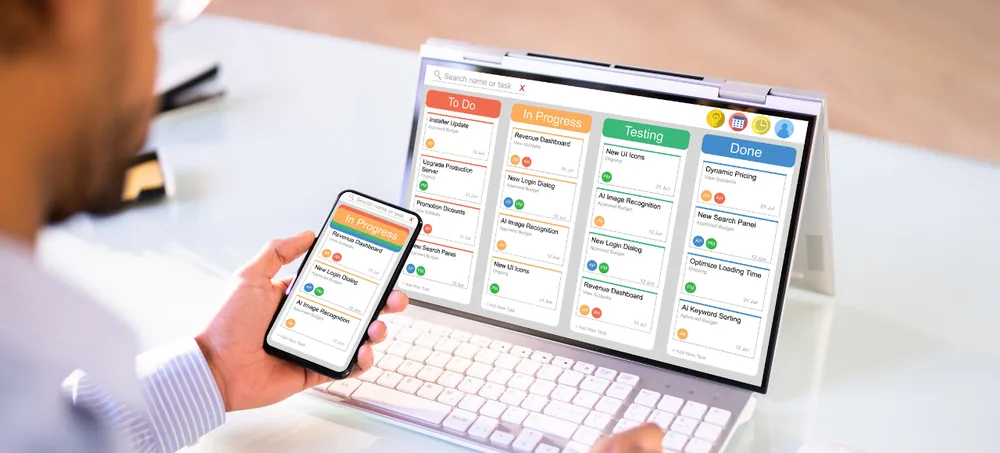
Scale smarter with a complete AI-driven ERP solution built for manufacturing, distribution, and e-commerce businesses etc...

Best CRM India | Cloud CRM Software For Business | ERPLax
Cloud CRM Across India

Best CRM India

Best CRM India - ERPLax Cloud CRM

Nearly every CRM on your shortlist has the same features. Leads, pipeline, contacts, activities, reports, automation — the tick-lists are close to identical, which is why comparing them by feature count tells you almost nothing. What actually separates a CRM that works from one that gets abandoned is whether your sales team keeps it updated. A pipeline last touched three weeks ago is not a pipeline. ERPLax provides CRM capabilities through a cloud-only SaaS ERP platform, and the honest advice below applies whichever one you pick. Relevant whether you are comparing customer relationship management software India vendors list, weighing a best CRM system India shortlist, evaluating CRM solutions India teams already run, or scoping a CRM platform India operations depend on. Built in Bengaluru, Karnataka, delivered nationally.

  • Leads
  • Customers
  • Pipeline
  • Contacts
  • Activities
  • Reporting
19+ Years of Experience 1500+ Clients 1700+ Projects

Talk to EchoPx Technologies

Tell us how your sales team tracks opportunities today — including if the answer is WhatsApp.

Verified Experts CRM consultants & business analysts
Free Consultation No Obligation 24hr Response
0YearsExperience delivering technology solutions aligned with business requirements.
0ClientsOrganizations supported through technology solutions.
0ProjectsProjects delivered across different business requirements.
The Problem

Customer relationship challenges businesses face

Five problems a CRM is bought to solve. Every one of them is solved only to the extent that somebody enters the information, which is why the sixth matters more than the other five.

Managing customer information

Contact details, communication history, sales discussions, requirements and follow-ups accumulate across channels, and most of it lives in individual inboxes until somebody leaves.

Customer management and sales management information held centrally rather than personally, which is the baseline for online CRM software India buyers.

Lead management challenges

New enquiries, qualification, follow-ups and conversion each need a step and an owner. Without them, leads are not lost so much as quietly forgotten.

Lead management software India teams adopt should make capture and qualification a workflow with an assignee — the core of any sales CRM software India shortlist.

Sales pipeline visibility

Managers need to see opportunity stages. The catch is that a pipeline view shows you the last time somebody typed, not the current state of the deal.

Pipeline stages that get updated because updating them is quick, with sales reporting that follows from it rather than a separate exercise.

Communication management

What was discussed, what was promised and when to follow up are the details that decide deals, and they are the first things to evaporate when a week gets busy.

Interaction records attached to the customer rather than a person's memory, which matters most in real estate CRM software India use cases where response speed decides the deal.

Disconnected sales processes

When a won deal has to be retyped into the system that raises the order, the CRM becomes an extra step rather than a shortcut — and extra steps are what people stop doing.

CRM connected to the ERP workflows that follow a closed sale.

The problem nobody puts on the requirement list

Adoption. A CRM with every feature that the team updates once a fortnight produces worse decisions than a simple one updated daily, because it looks authoritative while being out of date.

Judge any CRM on how little effort an update takes — true for enterprise tools and CRM software for small business India alike.

What Actually Decides It

The best CRM is the one your team updates

Put two CRMs side by side. One has every feature on the comparison chart; the other has fewer but takes ten seconds to update after a call. Six months in, the first is a museum of three-week-old deals that managers still quote in meetings, and the second is telling people the truth. Feature depth is easy to evaluate and mostly irrelevant. Update friction is hard to evaluate and decides everything — which is why we would rather you tested it than read about it.

Six things ERPLax supports

A cloud CRM solution for organisations seeking centralized customer relationship management, with customer processes handled through configurable ERP workflows. Delivered as a SaaS CRM solution, with sales automation aimed squarely at removing the admin that stops teams updating anything.

  • Lead management
  • Customer information management
  • Sales workflows
  • Opportunity tracking
  • Customer communication
  • Reporting
Two CRMs, six months in The dots are features. They are not what separates these two. EVERY FEATURE TICKED LAST UPDATED BY SALES three weeks ago a pipeline nobody trusts FEWER FEATURES LAST UPDATED BY SALES this morning a pipeline people act on Every CRM has the features. Whether anyone updates it decides the rest. Illustrative — test update friction yourself during any trial or demo
Cloud CRM India

How the platform is delivered

Customization means configuration and development within the ERPLax SaaS platform according to business requirements — which matters here mainly because a pipeline shaped like your actual sales process is one people will keep current.

Cloud-only SaaS

Delivered on a paid subscription with hosting, updates, security and backups included. There is no on-premise or self-hosted option and no free tier.

Connected to what follows the sale

A closed deal continues into the order, the invoice and the customer record without retyping, which removes the commonest reason sales teams stop updating a CRM.

Pipeline shaped to your process

Stages, fields and workflows configured to how your team actually sells rather than a default someone has to work around.

How to judge us, and everyone else

During any demo, ask to log a call and move a deal a stage yourself. Count the clicks. That number predicts whether your pipeline will be accurate in six months better than any feature list will.

Features

CRM software features

Seven capability areas, which most CRMs also have. Read them as a baseline to check rather than a reason to choose.

Lead Management

Lead capture, categorization, follow-up activities and opportunity tracking, so a new enquiry has an owner and a next step from the moment it arrives.

  • Lead capture
  • Categorization
  • Follow-up activities
  • Opportunity tracking

Opportunities managed through structured processes.

Customer Management

A centralized view of customer details, interaction history, requirements and business information.

  • Customer details
  • Interaction history
  • Requirements
  • Business information

Organised customer information the team can access.

Sales Pipeline Management

Opportunities tracked through stages from lead received to closure, with the stages configured to how your team actually sells.

  • Qualification
  • Sales discussion
  • Proposal
  • Closure

Visibility into sales activity, as current as the last update.

Contact Management

Organised customer communication details, so the right person is reachable without searching an inbox.

Customer interactions managed more effectively.

Sales Activity Tracking

Meetings, follow-ups, discussions and sales activities recorded against the opportunity they belong to.

Structured sales processes rather than recollection.

CRM Reporting

Reporting on leads, opportunities, customer activity and performance, built from what the workflows captured.

Operational visibility for management teams.

CRM Automation

Workflow notifications, activity tracking and process updates handled by the system. This is the feature that matters most, because every task it removes is one less reason to skip the update.

  • Workflow notifications
  • Activity tracking
  • Process updates

Less admin, which is what keeps a CRM current.

Workflow Examples

CRM workflows

Four workflows. Count the steps in each and ask how many your team would complete on a busy Friday.

Lead management

An enquiry becomes an owned opportunity, which is the handover most businesses lose leads in.

  1. Customer enquiry
  2. Lead creation
  3. Qualification
  4. Sales assignment
  5. Follow-up
  6. Opportunity tracking

Sales opportunity

From identified to closed, with the requirement analysis step that decides whether a proposal is worth writing.

  1. Opportunity identified
  2. Customer discussion
  3. Requirement analysis
  4. Proposal
  5. Sales progress
  6. Closure

Customer onboarding

What happens after the deal, which is where a disconnected CRM makes somebody retype everything.

  1. Customer confirmation
  2. Customer record created
  3. Process setup
  4. Relationship management
  5. Support

Follow-up

The smallest workflow and the one that quietly decides conversion, because most deals are lost to silence.

  1. Customer interaction
  2. Follow-up activity
  3. Reminder
  4. Sales update
  5. Reporting
Before You Select

How to choose the best CRM software India

Five things to establish, plus the test that predicts CRM success better than any of them.

01

Identify business requirements

Lead management, customer tracking, sales processes, reporting, integrations. Write the list from how your team sells today, not from a competitor's feature page.

02

Evaluate CRM features

Customer management, sales pipeline, lead tracking, automation, reporting. Expect most products to cover these, and treat a long list as a baseline rather than a differentiator.

03

Consider cloud CRM options

Cloud platforms give online access and centralized workflows, which matters most for teams who sell away from a desk — the same people least likely to update anything awkward.

04

Review integration needs

Whether the CRM connects to ERP, sales, inventory and customer operations. Every disconnection becomes a retyping job, and retyping jobs are where adoption dies.

05

Evaluate customization requirements

Different organisations sell differently. A configurable platform lets the pipeline match your process rather than forcing the team to work around a default.

06

Then run the ten-second test

In every demo, including ours, take the mouse yourself. Log a call. Move one deal forward a stage. Count the clicks and the seconds. Then imagine doing that eleven times on a Friday evening after a day of meetings. Whichever product you would still do it in is your answer, and it predicts whether your pipeline is accurate next year far better than any comparison chart.

Benefits

Benefits of CRM software India

Five changes that follow — all of them conditional on the team keeping it current.

Better customer visibility

Customer information held centrally rather than in individual inboxes and phones.

Improved sales coordination

Opportunities managed through structured workflows with an owner at every stage.

Organized lead management

Leads and follow-ups have a next step, so fewer go quiet by accident.

Enhanced customer relationships

What was discussed and promised stays attached to the customer rather than a person.

Integrated business processes

CRM connected to the ERP functions that a closed deal flows into.

Nothing to host or maintain

Hosting, updates, security and backups are part of the subscription, so no internal team carries them.

Industries

Industries using CRM software

Five kinds of business, each with a different reason the follow-up matters.

Real Estate

Enquiries, property opportunities and follow-ups, where response speed decides most outcomes.

Manufacturing

Business enquiries and customer accounts running straight into orders, so the handover matters.

Service Businesses

Customer requests and communication, where the relationship is the product.

Trading and Distribution

Many customers and repeat opportunities, where volume makes manual tracking break first.

Small Businesses

Organising customer management and sales before the volume makes it impossible to hold in memory.

Startups

Few deals but high stakes on each, so a lost follow-up is a material loss.

Why ERPLax

Why choose ERPLax CRM?

The case is specific rather than universal: if a closed deal needs to become an order, an invoice and a customer record, having CRM on the same platform removes the retyping that kills adoption. If you only need contact tracking and nothing follows the sale inside your systems, a dedicated CRM is lighter and will serve you better.

01

Cloud ERP platform

A cloud-only SaaS ERP platform designed for modern business operations, with no infrastructure to run alongside it.

02

Integrated business processes

Inventory workflows connect with sales, purchasing, finance and reporting activities in one environment.

03

Configurable workflows

Businesses configure CRM processes according to their requirements, including pipeline stages, workflows and role-based access, as configuration within the platform rather than code you own.

04

Business process automation

Automation opportunities identified across operational workflows rather than only inside the stock records.

05

Experienced technology partner

EchoPx Technologies brings 19+ years of experience delivering technology solutions.

06

1500+ clients, 1700+ projects

Delivery experience folded back into how each rollout is scoped, configured and supported.

FAQs

Frequently asked questions

What businesses ask while comparing CRM software in India.

There is no single answer. The best CRM solution depends on business requirements including features, workflows, integrations, scalability and operational needs - and, in practice, on whether your sales team will keep it updated. A CRM nobody enters data into is worth less than a spreadsheet somebody maintains.

CRM software refers to customer relationship management solutions used by businesses to manage customers, leads, sales activities and communication through one connected system.

Yes. ERPLax provides CRM capabilities through a cloud-only SaaS ERP platform. There is no on-premise or self-hosted deployment option, and hosting, updates, security and backups are part of the subscription.

Yes. Lead capture, categorization, qualification, follow-up activities and opportunity tracking are supported through configurable workflows.

Yes. CRM workflows help sales teams organize opportunities, customer information and sales activities. How much value that delivers depends heavily on how much of it fits the way your team already works.

Yes. ERPLax supports integrated CRM and ERP workflows, so customer and sales activity references the same records as the rest of the business rather than a separate copy.

Customization means configuration and development within the ERPLax SaaS platform according to business requirements, covering pipeline stages, workflows, roles and reports. Customers do not receive source code ownership.

It can be, though a small team with few open opportunities may manage perfectly well without one. The useful test is whether anything is currently being forgotten, rather than headcount.

Pricing depends on users, features, configuration, integrations, implementation requirements and subscription structure. ERPLax is a paid subscription with no free tier.

Check the date on your oldest open deal

The best CRM is the one your team keeps current, which is a question about update friction rather than feature count. Open whatever you track opportunities in and find the deal that has gone longest without an update. If that date surprises you, the problem is not which CRM you have — it is how much effort an update costs. Bring that to the first conversation and we can talk about whether software fixes it. ERPLax provides CRM capabilities through a cloud-only SaaS ERP platform with integrated workflows, configurable processes and centralized customer management. Tell EchoPx Technologies how your stock is tracked today and we will be straight about what the ERP workflows cover.

Serving businesses across India info@erplax.in Cloud subscription · No servers to maintain

Specialized Applications

ERP Solutions Built for Your Industry

Purpose-built & ready to deploy. Hover to explore, click to learn more.

View all modules

Testimonials

What Our Clients Say

Real stories from businesses running their operations on ERPLax.