
Best CRM Software in USA for Growing Businesses
Manage Leads, Sales Pipelines, Customer Communication, Follow-Ups, Automation and Reports in One Platform
Are you searching for the best CRM software in USA but finding that standard CRM platforms do not match your actual sales process?
ERPLax provides custom CRM software designed around the way your business manages leads, customers, opportunities, quotations, follow-ups, sales activities, and after-sales communication. Instead of forcing your team to adjust to a rigid system, ERPLax can be configured according to your sales stages, approval rules, reporting requirements, departments, and business workflow.
Request Custom CRM Quote
Schedule a free consultation with our CRM team.
Custom CRM Software Built Around Your Sales Process
Managing customer relationships becomes difficult when leads are stored in spreadsheets, follow-ups depend on individual employees, and sales information is scattered across emails, messages, notebooks, and separate applications.
ERPLax brings your customer and sales information into one centralized CRM software USA system. Your team can view every lead, customer interaction, sales opportunity, quotation, follow-up, task, and activity from a single platform.
The software can be customized for your terminology, sales stages, team structure, territories, products, services, approval levels, and reporting needs — genuine custom CRM software, not a rigid one-size-fits-all package.
ERPLax delivers complete customer relationship management software and dependable sales CRM software, whether you need focused CRM software for small business support or the best CRM for small business teams starting out. We support genuine CRM for sales teams, dedicated lead management software, and structured sales pipeline management software. Our platform functions as a scalable CRM system for small business needs and reliable CRM software for startups, backed by contact management software, complete business CRM software, genuine CRM software with automation, and truly customizable CRM software — a real CRM solution for growing businesses at every stage.
Disconnected processes commonly cause:
- Missed follow-ups
- Duplicate customer records
- Poor sales visibility
- Inaccurate sales forecasts
- Limited accountability
What Is CRM Software?
CRM stands for Customer Relationship Management. CRM software is a business application used to store customer information, manage leads, track sales opportunities, schedule follow-ups, record communication, automate repetitive activities, and monitor sales performance.
ERPLax CRM software can support the complete customer lifecycle, because the system is customizable to your specific sales process:
Why Do Businesses in the USA Need CRM Software?
What connected customer data changes about day-to-day sales operations.
Centralized Customer Information
Names, contacts, requirements, and communication history in one place.
Faster Lead Response
Automated assignment and reminders help teams respond before deals go cold.
Consistent Follow-Ups
Track upcoming, completed, overdue, and missed follow-ups clearly.
Improved Pipeline Visibility
See how many opportunities are at each stage and which need attention.
Better Team Accountability
Every call, task, and status change recorded against the relevant opportunity.
Accurate Sales Forecasting
Estimate potential revenue based on open opportunities and probability.
Key Features of ERPLax CRM Software
A complete customer relationship management platform for real sales teams.
Lead Management
Capture, score, qualify, and assign leads from initial enquiry to conversion.
Contact & Account Management
Complete records for individual contacts and business accounts.
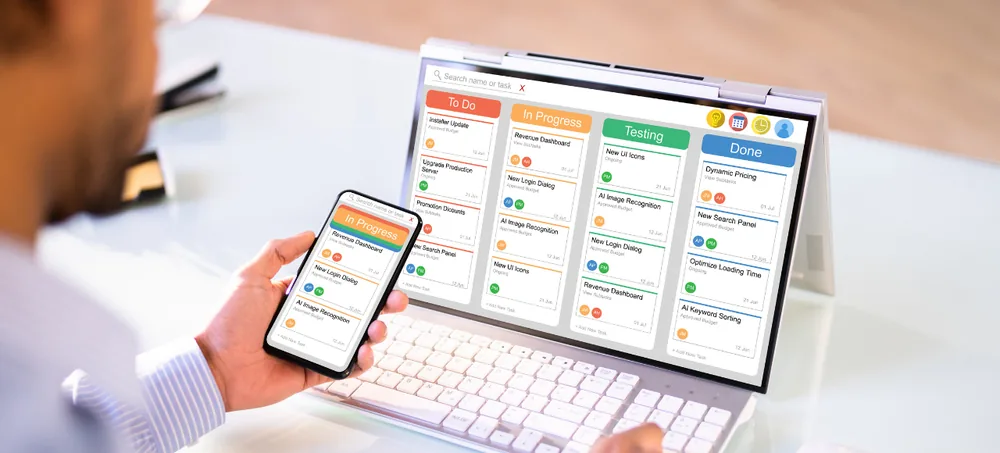
Custom Sales Pipeline
A pipeline that reflects your actual selling process, with multiple stages.
Opportunity & Deal Management
Track value, closing dates, probability, and responsible salesperson.
Follow-Up & Activity Management
Calls, emails, meetings, demos, and reminders in daily or calendar views.
Email Management
Connect business email to track relevant customer communication.
Quotation & Proposal Management
Custom formats, price lists, discount controls, and PDF generation.
Sales Workflow Automation
Assign leads, create tasks, escalate overdue items, and trigger approvals.
Sales Team & Territory Management
Organize activities by representative, team, region, or business division.
Sales Targets & Performance
Compare target versus achievement, conversion rates, and sales trends.
Role-Based Access & Security
Control access according to user role, department, branch, and territory.
Document & Attachment Management
Store agreements, proposals, price lists, and presentations against records.
Benefits of Choosing Custom CRM Software
What businesses gain from a CRM built around their actual sales process.
Real-Time Sales Visibility
View leads, opportunities, and team performance from updated dashboards.
Faster Lead Processing
Structured assignment helps your team contact new prospects quickly.
Fewer Missed Opportunities
Reminders and escalation rules help prevent leads from being forgotten.
Better Customer Experience
Review previous conversations and requirements before contacting customers.
Reduced Manual Errors
Standardized forms and connected data reduce repeated data entry.
Improved Sales Productivity
Less time searching for information, more time engaging with prospects.
Custom CRM Workflow
The CRM follows your sales terminology, approvals, and customer journey.
Scalable for Growth
Start with essential functions and add automation or ERP modules over time.
How to Choose the Best CRM Software in USA
The best CRM software is not simply the platform with the longest feature list. It should fit the way your team sells, communicates, reports, and serves customers.
Business Process Fit
Confirm the CRM can support your stages, responsibilities, approvals, and exceptions.
Ease of Use
Sales representatives should understand leads and activities without unnecessary screens.
Customization
Check whether sales stages, fields, forms, dashboards, and rules can be configured.
Integration Capability
The CRM should connect with the tools your business already uses.
Reporting Requirements
Confirm managers can access reports without repeatedly combining spreadsheets.
Scalability
Choose a system that supports additional users, branches, and modules as you grow.
Data Access & Permissions
Restrict customer information according to roles, teams, and hierarchy.
Deployment Preference
Determine whether you need cloud, Cloud, or a hybrid model.
Implementation & Training
Success depends on configuration, data preparation, and process adoption.
Total Business Value
Evaluate workflow improvement and scalability, not subscription price alone.
ERPLax CRM Compared with Standard CRM Platforms
A requirement-by-requirement look at how a configured CRM differs from an off-the-shelf platform.
| Requirement | Standard CRM Platform | ERPLax Custom CRM |
|---|---|---|
| Sales workflow | Uses predefined structures | Configured around your business process |
| Fields and forms | Limited by available settings | Custom fields, forms, and validations |
| Reports | Standard report library | Business-specific reports and dashboards |
| Approvals | Platform-dependent | Custom approval hierarchy |
| Integrations | Available connector-based options | Standard or custom API integrations |
| ERP connectivity | May require separate applications | Can connect with ERPLax ERP modules |
| Deployment | Usually cloud-based | Cloud-Based based on requirement |
| Implementation | General onboarding | Workflow study and custom configuration |
| Scalability | Based on plan and product limits | Modules can be introduced phase by phase |
| Industry process | Generic configuration | Industry-specific workflow development |
Who Can Use ERPLax CRM Software?
ERPLax CRM software can be configured for different industries and customer acquisition models.
How ERPLax CRM Software Works
Eight steps from understanding your workflow to ongoing system expansion.
Understand Your Sales Workflow
Study your existing lead and sales process before configuration.
Configure CRM Masters
Set up sales stages, lead sources, territories, and user roles.
Import Existing Data
Migrate customer, contact, and lead data from spreadsheets or a prior CRM.
Capture & Assign Leads
Leads enter the CRM and are assigned to the appropriate representative.
Manage Follow-Ups & Opportunities
Track calls, meetings, and opportunity stages through the pipeline.
Convert Customers & Orders
Successful opportunities convert into customers, orders, or projects.
Review Reports & Performance
Managers evaluate pipeline, conversion, and team performance.
Expand the System
Add automation, customer service, mobile access, or ERP modules over time.
CRM Integrations for Connected Business Operations
ERPLax can develop custom API integrations according to available documentation and technical feasibility.
Cloud-Based and Cloud CRM Deployment
ERPLax CRM software can be planned as a cloud-based or Cloud solution depending on your business and technical requirements.
Cloud CRM Software
Provides authorized users with access through an internet connection, suitable for distributed, remote, or field-based teams.
Cloud CRM Software
May be considered by businesses that require the application to operate within their own selected infrastructure.
Why Choose ERPLax for Custom CRM Development?
CRM based on your actual workflow, not a fixed template.
CRM Based on Your Actual Workflow
ERPLax studies how your team works and configures the CRM accordingly.
Flexible & Customizable
Fields, forms, stages, reports, and permissions customized per your scope.
Modular & Scalable
Begin with lead and opportunity management, add modules later.
CRM and ERP on a Connected Platform
Connect front-office customer management with sales orders and billing.
Cloud-Based Options
Select a deployment approach based on your infrastructure requirements.
Role-Based Access
Configure access by users, roles, teams, branches, and territories.
Custom Reports & Dashboards
Reports designed around employee and manager decision-making needs.
Training & Support
Implementation guidance and support per your service agreement.
Frequently Asked Questions
Answers to common questions about choosing the best CRM software in USA.
The best CRM software depends on your sales process, team size, reporting needs, required integrations, budget, and growth plans. A suitable CRM should be easy to use, customizable, scalable, and capable of managing leads, contacts, opportunities, follow-ups, automation, and reports. ERPLax provides custom CRM software configured according to individual business workflows.
Yes. ERPLax CRM can be configured for small businesses that need a structured way to manage enquiries, customer records, follow-ups, quotations, and sales pipelines. Businesses can start with essential modules and add more capabilities as they grow.
Yes. Sales stages, forms, fields, user roles, lead assignment rules, approval workflows, reports, and dashboards can be customized based on the agreed business requirements.
ERPLax CRM can be deployed as a cloud-based system depending on project requirements. Cloud access can be useful for businesses with remote employees, multiple locations, or field sales teams.
Cloud deployment can be considered when a business wants the system installed within its selected infrastructure. The appropriate deployment model is determined after reviewing technical, access, security, integration, and maintenance requirements.
Yes. ERPLax CRM can be connected with relevant ERP functions such as quotations, sales orders, inventory, billing, accounts, manufacturing, dispatch, and customer service.
Existing data can be imported after it is reviewed, cleaned, structured, and mapped to the new CRM fields. Import scope and data quality requirements should be finalized during implementation.
Yes. Businesses can create one or more sales pipelines with custom stages, opportunity values, probability levels, expected closing dates, activities, and responsible employees.
Yes. The system can create reminders, assign tasks, notify users, escalate overdue leads, and trigger selected actions based on configured workflow rules.
Email SMTP and approved WhatsApp API integrations can be considered based on the required workflow, provider capabilities, API availability, and project scope.
Yes. Custom reports can show assigned leads, completed activities, overdue follow-ups, conversion rates, pipeline values, closed sales, target achievement, and other performance indicators.
Mobile-friendly access or a mobile application can be planned according to the required workflow, selected platform, and project scope. Field representatives can use it to review leads, update visits, record notes, and schedule follow-ups.
Yes. Customer support or service modules can be added to record complaints, tickets, priorities, assignments, escalations, communication, and resolutions.
Implementation time depends on the number of modules, users, workflows, customizations, integrations, reports, data migration requirements, testing, and training scope. A project plan can be prepared after requirement analysis.
Yes. ERPLax follows a modular approach. Businesses can begin with lead and sales management and later add customer service, marketing workflows, mobile access, ERP, inventory, billing, or additional integrations.
Build the Right CRM for Your Business
The best CRM software in USA should help your team organize customer information, respond to leads, follow up consistently, and make informed sales decisions. Speak with an ERPLax CRM expert to discuss your sales process, integrations, and implementation priorities.