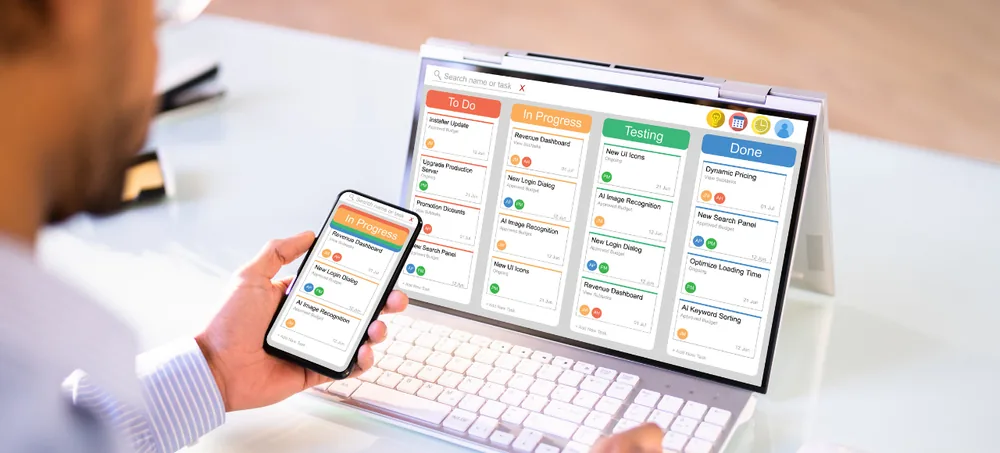
Manage leads, customers, sales opportunities, follow-ups and service requests through one flexible CRM platform designed around your workflow. ERPLax develops custom CRM systems UK businesses can use to centralise customer information, automate repetitive sales activities and give every authorised team member a clear view of the customer journey. Start with the functions you need today and add sales, inventory, billing, accounts, support, projects or ecommerce modules as your business grows.
Tell us about your sales process today. We will map it to a CRM configuration and share a scope and quote.
Managing customers through spreadsheets, inboxes and separate applications creates information gaps. ERPLax brings these activities together in a configurable customer relationship management platform.
Your team can record enquiries, assign leads, schedule activities, prepare quotations, monitor opportunities, save communication histories and review performance from one connected system. Relevant information can also flow into ERP functions such as sales orders, inventory, billing, accounts, service and reporting — the result is a CRM environment that supports the way your company actually works rather than adding another disconnected tool.
Enquiries come in from several channels. What happens after a deal closes touches several more systems. ERPLax CRM sits in the middle of both, so nothing has to be re-typed on either side.
A CRM system, or customer relationship management software, is used to organise and manage interactions with prospects and customers — lead capture, contact and account management, sales pipeline tracking, quotations, marketing segmentation, customer service, tasks and reporting.
A CRM system creates a central customer database where authorised users can view contact details, enquiry sources, calls, emails, meetings, quotations, purchases, complaints, follow-ups and other relevant activities.
ERPLax can deliver CRM as an independent customer management platform or connect it with inventory, sales, billing, accounts, ecommerce, projects and service modules.
Most businesses researching CRM solutions UK vendors offer are trying to solve one of two problems: either they have no custom CRM system at all and are still running on spreadsheets, or they have outgrown an online CRM system that was never configured around how their sales team actually works. ERPLax builds as genuine bespoke CRM software UK companies configure field by field, rather than a fixed template with a UK flag on the marketing page.
Whether you need a straightforward customer management system for one small sales team or full business CRM software connected across departments, the same platform scales with you — which is really the point of a proper CRM system for growing businesses rather than a tool you outgrow within a year.
Eight signs a growing business has outgrown spreadsheets and inboxes for managing customers.
Important customer details may be stored in individual inboxes, spreadsheets, messaging applications and personal notes. A CRM creates one organised customer record that authorised employees can access.
Without structured reminders and assigned activities, leads may remain unattended. CRM workflows help sales representatives see which calls, meetings, quotations and tasks are due.
Managers need more than a list of leads. They need visibility into opportunity stages, expected values, next actions, sales probability and reasons for lost deals.
Repeatedly entering the same customer information into quotations, orders, invoices and service records wastes time and increases the possibility of mistakes.
Preparing sales reports manually often requires collecting information from several people. CRM dashboards can present pipeline, activity, lead sources and conversion information from shared records.
Customers should not have to repeat the same information every time they contact a business. A shared interaction history helps employees understand previous enquiries and support requests.
Every company uses different sales stages, customer categories, approval rules and reporting methods. ERPLax can configure fields, forms, workflows and dashboards around those requirements.
Processes that work for a small team may become inefficient as lead volume, customer numbers, locations and sales representatives increase.
Ten module groups cover the day-to-day of running a sales team. GDPR configuration and multi-branch structure get their own section right after.
Capture and organise enquiries received through different business channels, with automatic assignment by location, product or sales representative.
Maintain structured records for individual contacts and business accounts, as the customer database software the rest of the team actually keeps up to date.
Create sales pipelines that reflect your actual sales process, run as sales CRM software teams review daily.
Track each potential sale from qualification through closure.
Schedule and monitor customer-related activities so nothing waits on memory.
Prepare quotations using approved customer, product, pricing and tax information.
Use current opportunities to understand expected sales.
Provide users and managers with relevant performance information, as CRM database software should.
Automate repetitive CRM activities using configurable conditions and actions — genuine CRM automation software, not just reminders.
Control which users can view, create, edit, approve or export information.
Two areas that matter more once a business has more than one office, or more than a handful of customer records to be careful with.
ERPLax can configure functions that help businesses manage customer information responsibly.
Software functionality can support your data-management process, but legal compliance also depends on your policies, configuration and operating practices — appropriate legal or data-protection advice should also be obtained.
Configure CRM access and reporting for businesses with more complex structures.
What changes once leads, customers, quotations and support all live in one connected record.
Bring customer details, conversations, activities, quotations, orders and support information together in one organised profile.
Automatic assignment, notifications and activity queues help the correct salesperson respond without waiting for manual distribution.
Reminders, overdue lists and escalation workflows make outstanding customer activities easier to monitor.
Managers can view opportunity progress, expected values and next actions without relying on disconnected spreadsheets.
Connected customer records reduce repeated entry and inconsistent information across departments.
Configured stages, required fields and approval steps help teams follow a defined sales process while retaining necessary flexibility.
Employees can review previous communication and relevant transaction history before responding to a customer.
Live reports provide clearer information about lead sources, conversions, sales performance and service activity.
ERPLax can adapt the CRM to your terminology, approval structure, forms, documents and reporting requirements.
Begin with lead and contact management, then introduce automation, customer service, inventory, billing or ERP modules phase by phase.
ERPLax CRM software can be configured for different sales, service and account-management environments. Industry-specific fields, stages, documents and workflows can be added according to the project scope.
The same platform, scoped differently depending on who is using it day to day.
Small businesses often begin by managing customers through spreadsheets and email. ERPLax can provide focused CRM for small business UK requirements without introducing every possible module from the beginning.
ERPLax sales CRM software gives representatives and managers a shared view of enquiries, prospects, opportunities and activities.
A connected CRM helps customer service employees understand the customer before responding.
Nine stages from first discovery call to the reports your managers actually check.
ERPLax reviews your enquiry channels, customer types, sales stages, user responsibilities, approval requirements and reporting needs.
Relevant modules, fields, pipelines, forms, permissions, documents and dashboards are configured around the agreed process.
Enquiries are entered manually or received from connected channels such as your website, ecommerce platform or third-party application.
The enquiry is assigned to a user or team according to configured rules.
The salesperson records requirements, activities, meetings, product interests and next actions.
Qualified leads move into the sales pipeline. The team can prepare quotations and obtain internal approvals when required.
A successful opportunity can be converted into a customer, order, project, contract or another appropriate business record.
Connected modules can manage order fulfilment, billing, implementation, support or ongoing account management.
Managers review pipeline, conversion, activity, customer and service information through dashboards and reports.
ERPLax CRM can be integrated with other business systems where suitable APIs or technical interfaces are available. All integrations are subject to technical feasibility, provider permissions and API availability.
ERPLax can discuss the appropriate deployment model after reviewing the organisation’s workflow, infrastructure, security requirements and growth plans.
Allows authorised users to access the application through an internet connection.
Deployed within infrastructure selected by the customer.
An off-the-shelf CRM can be appropriate when a company has a standard sales process and is comfortable adapting its workflow to the available features. ERPLax focuses on configuring and extending the CRM around real operational requirements rather than forcing every company into the same structure.
Built by a team with 19+ years in business software, across 1,500+ clients and 1,700+ delivered projects.
ERPLax designs CRM functions around your sales, customer service and account-management requirements.
Sales stages, customer categories, fields, activities, approvals and documents can be adapted to your process.
Implement essential CRM features first and add ERP, inventory, billing, service, projects or automation later.
Choose a deployment model according to your operational and infrastructure requirements.
Connect the CRM with websites, ecommerce platforms, email services, messaging providers, accounting tools and custom applications.
Control access according to team, position, territory, branch, record ownership or other business rules.
Give managers and users the information relevant to their responsibilities.
Customer, contact and lead information can be migrated from spreadsheets or existing systems after review, mapping and validation.
ERPLax supports configuration, testing, user training, deployment and post-launch improvements.
The CRM can expand as your number of users, teams, customers, locations and operational requirements increase.
Your CRM should make customer management easier, not force your team to work around unsuitable software. Discuss your current process with our team and receive recommendations for the modules and implementation approach that suit your organisation.
Specialized Applications
Purpose-built & ready to deploy. Hover to explore, click to learn more.
Testimonials
Real stories from businesses running their operations on ERPLax.
ERPLax gave us real-time visibility into stock across three warehouses. Wastage dropped and our fulfillment time improved almost overnight.
GST e-invoicing used to eat up two days every month. With ERPLax's accounting module it's now automatic and our filings are always on time.
Billing at our stores used to take a minute per customer. ERPLax's POS module cut that to under 15 seconds, even during peak festival rush.
Payroll for 200+ employees across two branches used to take our HR team a full week. ERPLax's HRM module now runs it in a single afternoon.
Tracking batch numbers and expiry across our distribution network was a nightmare on spreadsheets. ERPLax's inventory module made it effortless.
Front desk, housekeeping and billing are now all on one screen. ERPLax's hotel management module has made check-in day a breeze for our staff.
Fee collection, attendance and report cards used to live in three different tools. ERPLax brought it all into one dashboard our staff actually enjoys using.
Tracking material costs and site progress across four active sites was chaos before ERPLax. Now our project managers update status from their phones daily.
Our online store orders now sync straight into inventory and accounting — no more manual entry, no more overselling out-of-stock items.
Our sales team can now see every lead's history and follow-ups in one place. Deal closures are faster and nothing falls through the cracks anymore.
ERPLax gave us real-time visibility into stock across three warehouses. Wastage dropped and our fulfillment time improved almost overnight.
GST e-invoicing used to eat up two days every month. With ERPLax's accounting module it's now automatic and our filings are always on time.
Billing at our stores used to take a minute per customer. ERPLax's POS module cut that to under 15 seconds, even during peak festival rush.
Payroll for 200+ employees across two branches used to take our HR team a full week. ERPLax's HRM module now runs it in a single afternoon.
Front desk, housekeeping and billing are now all on one screen. ERPLax's hotel management module has made check-in day a breeze for our staff.
Fee collection, attendance and report cards used to live in three different tools. ERPLax brought it all into one dashboard our staff actually enjoys using.
Tracking material costs and site progress across four active sites was chaos before ERPLax. Now our project managers update status from their phones daily.
Our online store orders now sync straight into inventory and accounting — no more manual entry, no more overselling out-of-stock items.
Our sales team can now see every lead's history and follow-ups in one place. Deal closures are faster and nothing falls through the cracks anymore.
