
CRM Customer Relationship Management Software India
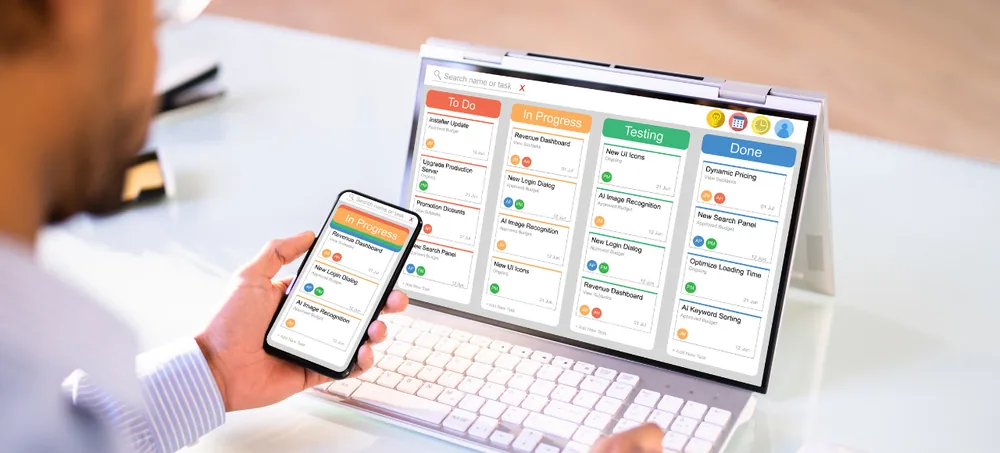
Custom CRM software built around your sales and customer workflow. Manage enquiries, leads, prospects, customers, contacts, opportunities, quotations, follow-ups, sales pipelines, customer service, approvals, automation, and reports through one customizable CRM platform — ERPLax provides CRM Customer Relationship Management Software India for small, medium, and growing businesses that need better control over customer information and sales activity, instead of managing leads in spreadsheets, follow-ups in personal reminders, and quotations in separate documents, developed around your actual business workflow rather than rigid ready-made software.
Request Custom CRM Quote
Schedule a free consultation with our CRM team.
CRM Customer Relationship Management Software India for Growing Businesses
As a business grows, so does the amount of customer information employees need to manage — new enquiries arrive from websites, phone calls, referrals, campaigns, and field sales teams, while existing customers contact the company for support, additional products, or repeat requirements. Without a structured CRM system, this activity becomes fragmented. ERPLax CRM Customer Relationship Management Software India helps bring these activities into one centralized system.
Missed Sales Enquiries
Enquiries fall through the cracks without a capture system.
Delayed Follow-Ups
Without reminders, timely responses slip.
Customer Information Spread Across Employees
Details live in individual inboxes and notebooks.
No Clear Lead Ownership
Without assignment, leads can go unworked.
Limited Pipeline Visibility
Managers can't see where opportunities stand.
Quotations Difficult to Track
Proposals get lost without a connected record.
Inconsistent Sales Stages
Different teams track deals in different ways.
Poor Customer History
Past interactions are hard to piece back together.
Untracked Service Requests
Post-sale issues go unrecorded and unresolved.
Manual Sales Reporting
Consolidating numbers by hand takes real time.
Limited Workflow Automation
Repetitive admin work eats into selling time.
Difficulty Connecting CRM with Other Systems
Disconnected tools mean data doesn't flow.
What Is Customer Relationship Management Software?
Customer Relationship Management, or CRM, is a system used to manage interactions and information relating to existing and potential customers — CRM platforms commonly bring sales, marketing, and customer support information into a shared environment. CRM is more than a customer contact database: it helps businesses create a structured workflow from initial enquiry through sales conversion and ongoing customer management, from website enquiry through lead assignment, follow-up, demo, quotation, negotiation, and sale.
Leads, Prospects & Customers
The full contact lifecycle tracked in one place.
Contacts & Opportunities
Decision-makers linked directly to active deals.
Follow-Ups, Calls & Meetings
Every touchpoint logged against the right record.
Tasks, Quotations & Sales Stages
Day-to-day actions tracked alongside deal progress.
Customer Communication, Service & Reports
History and support connected to business reporting.
Key Features of ERPLax CRM Software India
A complete CRM Software India foundation covering leads, customers, follow-ups, opportunities, and service.
Lead Management
Capture potential customers from initial enquiry.
Lead Assignment
Assign leads by salesperson, territory, product, or source.
Enquiry Management
Track customer enquiries from first contact.
Customer Management
Maintain customer information in one central system.
Contact Management
Track multiple contact persons within B2B customer accounts.
Sales Pipeline Management
Give management visibility into active opportunities.
Opportunity Management
Convert qualified leads into tracked active opportunities.
Follow-Up Management
Help sales teams know what needs to happen next.
Task and Activity Management
Track calls, meetings, demonstrations, and internal tasks.
Quotation Management
Connect quotations with leads, customers, and opportunities.
Sales Forecasting
Review potential future sales using pipeline value and probability.
Sales Team Management
Structure CRM according to your sales organization.
Territory Management
Organize customers and leads according to region or zone.
Customer Communication History
A structured record of every important interaction.
Customer Service Management
Manage service requests, complaints, and support tickets.
Reminder and Notification Management
Keep users on top of follow-ups and pending actions.
Custom CRM Fields
Configure fields according to your industry's requirements.
Approval Workflow
Configure approvals for discounts, pricing, and quotations.
User Roles and Access Control
Configure access according to role, team, and territory.
CRM Reports and Dashboards
Sales, pipeline, and customer activity in one dashboard.
Why Businesses in India Need CRM Software
What a connected CRM platform solves as enquiries and customer relationships grow harder to track.
Centralize Customer Information
One structured database instead of spreadsheets and phones.
Avoid Missing Leads
Capture, assign, and track enquiries from every source.
Improve Follow-Up Management
Track follow-up date, discussion, outcome, and next action.
Improve Sales Pipeline Visibility
Know where each opportunity currently stands.
Improve Customer History
Review relevant enquiries, calls, meetings, and quotations.
Improve Sales Accountability
Assign every lead and opportunity to a specific employee.
Improve Quotation Tracking
Keep quotations connected to the lead and opportunity.
Improve Reporting
Reduce dependence on manually consolidated spreadsheets.
Standardize Sales Processes
Define consistent stages, responsibilities, and approvals.
Support Growth
Add users, teams, territories, and integrations as you expand.
Benefits of CRM Solutions in India
What CRM Customer Relationship Management Software India delivers for growing sales teams.
Centralized Customer Data
Leads, prospects, customers, contacts, and activities in one system.
Better Lead Management
Capture enquiries with defined ownership, status, and follow-up.
Faster Follow-Ups
Help salespeople identify upcoming and overdue actions.
Better Sales Pipeline Visibility
Clearer visibility into active opportunities for management.
Improved Sales Accountability
Assign leads, activities, and opportunities to specific employees.
Better Customer Communication
Review relevant customer history before communicating.
Consistent Sales Processes
Standard stages and workflows across the sales organization.
Reduced Spreadsheet Dependency
Replace scattered lead lists with centralized CRM records.
Better Reporting
Generate customer and sales reports directly from CRM transactions.
Custom CRM Workflow
Configured around your actual sales process.
Scalable Customer Management
Add users, teams, territories, and integrations as you grow.
CRM Software for Different Industries in India
ERPLax CRM Solutions India can be configured for different industries because customer journeys vary across business models.
Lead-to-Customer CRM Workflow
From first capture to ongoing management — the nine stages a structured CRM Software in India implementation manages for you.
Capture Lead
Leads arrive through website forms, phone, referral, campaign, or walk-in.
Assign Lead
Allocate responsibility to the appropriate salesperson or team.
Qualify Prospect
Understand customer requirement, budget, and timeline.
Schedule Follow-Up
Plan calls, meetings, demonstrations, and next actions.
Create Opportunity
Move qualified prospects into the active sales pipeline.
Prepare Quotation
Create and track the commercial proposal.
Negotiate
Record discussions, revisions, and pending activities.
Convert
Convert successful opportunities into customers or sales transactions.
Continue Customer Management
Maintain relevant customer activities and service information.
CRM Workflow Automation
Repetitive CRM administration can consume valuable sales time. Automation can support:
CRM Software Integrations
CRM often needs to communicate with other business applications.
CRM and ERP Integration
CRM primarily manages customer-facing sales processes, while ERP manages broader operational activities such as sales orders, purchasing, inventory, manufacturing, and billing — connecting both creates a continuous workflow from CRM lead through opportunity, quotation, customer, sales order, inventory, invoice, and payment. ERPLax provides CRM alongside broader ERP capabilities including inventory management, manufacturing ERP, distribution ERP, ecommerce ERP, billing, POS, HR management, reporting, and workflow automation. CRM and ERP integration can therefore connect:
CRM Software for Small Businesses in India
CRM software is not limited to large enterprises — small businesses often begin managing leads through spreadsheets, email, and personal reminders. A centralized CRM organizes this information as enquiry volumes grow.
Starting Point
Leads, Customers, Follow-Ups, Quotations, and Reports.
Expansion
Sales Pipeline, Approvals, Automation, Customer Service, and ERP Integration.
CRM Software for Medium and Growing Businesses
Growing organizations may need more advanced CRM capabilities, configured rather than forcing every organization into the same sales workflow.
How ERPLax CRM Works
From understanding your sales process to ongoing expansion — the ten stages ERPLax manages for you.
Understand Your Sales Process
Review lead sources, customer types, sales teams, and existing applications.
Map CRM Workflow
Define how a prospect moves through the sales process.
Configure CRM Masters
Set up customers, contacts, products, lead sources, and pipeline stages.
Configure Custom Fields
Add the customer and sales information required for your industry.
Configure User Roles
Define access according to responsibilities.
Configure Reports
Create required sales and management reports.
Configure Integrations
Connect relevant compatible systems where required.
Test Workflows
Test lead assignment, follow-ups, opportunities, and approvals.
User Training
Train employees according to their CRM responsibilities.
Expand as Needed
Add workflows, users, reports, and integrations as requirements grow.
How to Choose the Best CRM Software in India
There is no single CRM that is automatically best for every organization — the right CRM depends on your sales process, users, customer types, reports, integrations, and required customization.
Lead Management
Evaluate lead capture, source, assignment, status, and conversion.
Customer Management
Check whether it maintains complete customer and contact information.
Sales Workflow Fit
Can CRM support your actual sales process end to end?
Sales Pipeline
Managers should be able to monitor opportunities by stage.
Follow-Up Management
Upcoming and overdue activities should be easy to identify.
Quotation Management
Review creation, revision, pricing, discounts, and approval.
Customization
Evaluate custom fields, forms, sales stages, and workflows.
Reports and Dashboards
Identify management reporting requirements before implementation.
User Roles
Ensure employees receive access appropriate to their responsibilities.
Integration Capability
Consider whether CRM needs to connect with ERP, website, or email.
Scalability
Consider future users, teams, territories, and customer records.
Implementation and Support
Review requirement analysis, testing, training, and ongoing support.
Why Choose ERPLax CRM Customer Relationship Management Software India?
ERPLax provides CRM software developed around actual business workflows, not rigid ready-made software.
Custom CRM Development
Developed around actual business workflows, not a fixed template.
Business Workflow-Based CRM
Lead stages, opportunities, and approvals configured to your process.
Lead and Customer Management
Manage prospects and customers through connected CRM records.
Custom Sales Pipeline
Define pipeline stages according to how your company sells.
Follow-Up Management
A structured way to manage activities, reminders, and next actions.
Quotation Management
Connect quotations with leads, opportunities, and customers.
Workflow Automation
Automate selected assignments, notifications, and approvals.
Role-Based Access
Configure access according to teams and responsibilities.
Custom Reports and Dashboards
CRM reports based on your sales and management requirements.
CRM + ERP Integration
Connect customer-facing activity with inventory, orders, and billing.
Modular and Scalable
Begin with essential functionality and add more as you grow.
Suitable for Growing Businesses
CRM integrates into ERPLax's wider ERP, inventory, and billing platform.
Build a Better Customer Relationship Process With ERPLax CRM
Customer information should not depend on scattered spreadsheets, individual employee notes, and missed follow-up reminders. ERPLax CRM Customer Relationship Management Software India helps businesses manage leads, prospects, customers, contacts, opportunities, quotations, sales pipelines, follow-ups, customer service, and reports through one customizable platform.
Frequently Asked Questions
CRM Customer Relationship Management Software India is CRM software used by Indian businesses to manage leads, prospects, customers, sales opportunities, follow-ups, quotations, customer service and related information through a centralized system.
Customer Relationship Management Software India refers to CRM systems used to centralize customer information and support sales, marketing and customer-service processes.
Customer Relationship Management India refers to the software and processes Indian businesses use to organize interactions and relationships with current and potential customers.
Yes, ERPLax provides custom CRM development for leads, customers, follow-ups, opportunities, quotations, service requests and management reports.
There is no single CRM that is best for every business. The right solution depends on sales workflow, users, pipeline requirements, customer management, reports, integrations and customization needs.
Yes, CRM can manage leads, enquiries, follow-ups, quotations, sales pipeline stages and customer records in one connected system.
Yes, CRM can track follow-up dates, assigned users, activities, outcomes and next actions.
Yes, ERPLax's custom CRM development offering includes quotations alongside leads, customer relationships and sales activities.
Yes, ERPLax custom CRM includes service-request workflows alongside sales and customer management.
Yes, CRM can connect with ERP and other business systems, including inventory, manufacturing, distribution, ecommerce, billing, POS, HR management, reporting and automation.
Yes, CRM can be used by small businesses to manage leads, enquiries, follow-ups, quotations, pipeline stages and customer records.
Yes, ERPLax provides business analysis, workflow design, custom pipeline stages, approval workflows, reports and integrations tailored to the sales process.
Build a Better Customer Relationship Process With ERPLax CRM
Whether you need a straightforward sales CRM or a wider system integrated with ERP, inventory, billing, and workflow automation, ERPLax can configure CRM around your business requirements.
Phone: +91 97399 66977 · Email: info@erplax.com