
CRM Management Software India
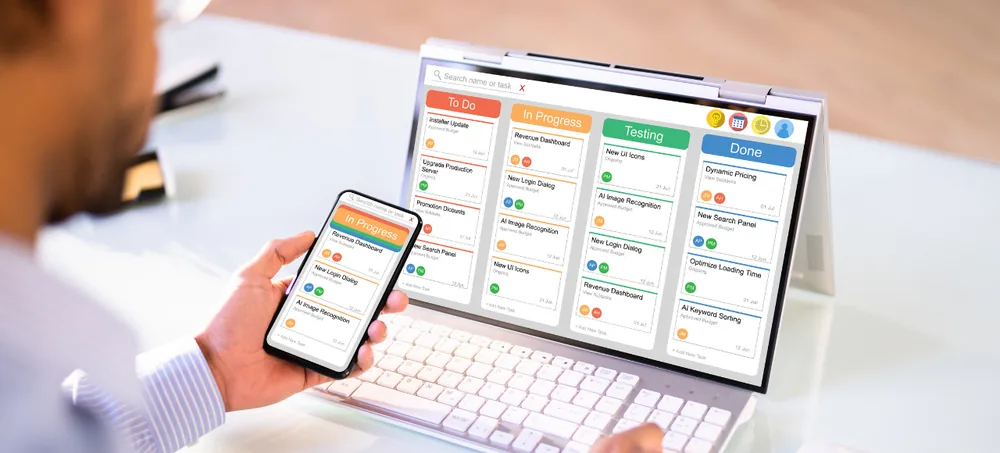
Custom CRM software to manage leads, customers, sales opportunities, quotations, follow-ups, customer service, approvals, automation, and reports — all from one connected platform. Instead of keeping leads in spreadsheets, customer details in employee phones, follow-up schedules in personal reminders, and quotations in separate documents, ERPLax CRM Management Software India brings these activities into one customizable system, with modules, fields, and sales stages configured around your organization's actual workflow, and expanded with users, teams, reports, and integrations as your business grows.
Request Custom CRM Quote
Schedule a free consultation with our CRM team.
CRM Management Software India for Growing Businesses
Managing leads and customers becomes increasingly difficult when a business grows beyond a small sales team — spreadsheets, email, and personal reminders may work at low enquiry volumes, but become harder to control as more salespeople, prospects, and sales activities are added. ERPLax CRM Management Software India helps organize these customer and sales processes through one connected, cloud-accessible system.
Leads Not Assigned Quickly
Enquiries waiting for assignment can sit untouched while prospects look elsewhere.
Duplicate Customer Information
The same customer entered more than once creates conflicting records.
Untracked Sales Opportunities
Opportunities without a system can quietly fall out of view.
Pending Quotations
Quotations without follow-up can stall a sale that was ready to close.
Limited Pipeline Visibility
Managers can't see where each opportunity currently stands.
Scattered Customer Communication
Communication spread across employees is hard to bring together.
Limited Automation
Manual admin work takes time away from actual selling.
Difficult CRM-to-ERP Coordination
Disconnected systems mean sales and operations data don't line up.
What Is CRM Management Software?
CRM stands for Customer Relationship Management — CRM management software is a business application used to organize information and activities involving prospects, customers, and sales processes, going beyond just storing names and phone numbers to create a structured system for managing the customer journey from initial enquiry through sales conversion and ongoing customer service.
Leads & Prospects
Potential customers tracked from first enquiry through qualification.
Customers & Contacts
Company and contact information maintained in one CRM database.
Sales Opportunities & Stages
Qualified prospects moved through defined stages toward conversion.
Follow-Ups & Activities
Calls, meetings, and tasks scheduled and followed through to a next action.
Quotations
Commercial proposals tracked against each customer and opportunity.
Customer Communication & Service
A structured record of interactions that continues after the sale.
Reports
Sales and customer information consolidated into management reporting.
Key Features of ERPLax CRM Software India
ERPLax's current CRM Software India offering includes lead management, customer records, sales pipelines, follow-ups, sales automation, reporting, and integrations, with modules configurable around the business process.
Lead Management
Capture potential customers from initial enquiry with source, priority, and status tracking.
Lead Assignment
Allocate leads by salesperson, team, territory, product, or lead source.
Enquiry Management
Track customer enquiries from first interaction through to next action.
Customer Management
Maintain company information, contacts, and history in one CRM database.
Contact Management
Track multiple contacts within one account — owner, purchase, finance, technical, and more.
Sales Pipeline Management
Give employees and managers visibility into active opportunities by stage.
Opportunity Management
Track deal value, stage, probability, and expected closing date.
Follow-Up Management
Answer the critical question of what needs to happen next for every prospect.
Task and Activity Management
Create calls, meetings, demonstrations, site visits, and internal tasks.
Quotation Management
Connect quotations directly with prospects, opportunities, and customers.
Sales Forecasting
Support forecasting using opportunity value, stage, probability, and closing date.
Sales Team Management
Configure CRM around sales managers, team leaders, and field or inside sales.
Territory Management
Organize customer and prospect records by state, city, region, or sales zone.
Customer Communication History
A structured timeline of calls, meetings, and follow-ups for every customer.
Customer Service Management
Track service requests, complaints, priority, and resolution after the sale.
Customer Retention and Renewal Management
Manage renewal reminders, repeat enquiries, and cross-sell or upsell opportunities.
Custom CRM Fields
Configure fields for the customer information your industry actually needs.
Approval Workflow
Route discounts, special pricing, and quotations through configured approvals.
User Roles and Access Control
Control CRM access by user, role, sales team, department, or territory.
CRM Reports and Dashboards
Get visibility into leads, pipeline, salesperson performance, and renewals.
Why Businesses in India Need CRM Software
What CRM solves as leads, customers, follow-ups, quotations, and sales opportunities become difficult to track manually.
Centralize Customer Information
Customer data scattered across spreadsheets and inboxes becomes one structured database.
Avoid Missing Leads
Capture, assign, and monitor enquiries arriving from every lead source.
Improve Follow-Up Management
Track follow-up date, assigned employee, discussion, outcome, and next action.
Improve Sales Pipeline Visibility
Understand where every active opportunity currently stands.
Improve Customer History
Authorized users can review relevant enquiries, calls, and quotations.
Improve Sales Accountability
Assign every lead, task, and opportunity to an employee or team.
Improve Quotation Tracking
Keep quotations linked with the relevant customer and opportunity.
Improve Customer Service
Keep service activity connected to customer records rather than separate.
Improve Reporting
Generate reports from sales activity instead of manual spreadsheets.
Standardize Sales Processes
Define common sales stages, assignment rules, and approval workflows.
Support Business Growth
Expand with additional users, sales teams, territories, and integrations.
CRM Software for Different Industries in India
ERPLax CRM India can be configured according to different industries, customer types, and sales cycles.
CRM Workflow Automation
Routine CRM administration can consume sales time — ERPLax's current CRM pages include business-rule-driven lead assignment, reminders, approvals, escalations, and customer notifications among CRM automation examples.
Lead-to-Customer CRM Workflow
A structured CRM Software in India implementation can manage the complete customer journey — the nine stages ERPLax connects for you, from first enquiry to ongoing relationship management.
Capture Enquiry
Create enquiries from website, phone, email, referral, campaign, exhibition, or walk-in.
Assign Lead
Allocate responsibility to the appropriate salesperson or sales team.
Qualify Prospect
Understand customer requirement, product interest, budget, and timeline.
Schedule Follow-Up
Plan calls, meetings, demonstrations, and other activities.
Create Opportunity
Move qualified prospects into the sales pipeline.
Prepare Quotation
Create and track the commercial proposal.
Negotiate
Record discussions, revisions, and future actions.
Convert
Convert the successful opportunity into a customer or connected sales transaction.
Continue Relationship Management
Maintain customer communication, service history, renewals, and future opportunities.
CRM and ERP Integration
CRM manages customer-facing sales processes — ERPLax can connect it with wider ERP operations for a continuous workflow from lead to payment.
Standalone CRM
Manage leads, customers, opportunities, quotations, and follow-ups within a focused CRM environment.
CRM Connected with ERP
Extend CRM into sales orders, inventory, billing, outstanding, and management reports for one continuous workflow.
Customer Service and Retention Management
CRM should not necessarily end when a prospect becomes a customer — a wider Customer Relationship Software India workflow can continue through the customer lifecycle below.
Lead
A new enquiry enters the CRM from any lead source.
Sale
The opportunity is converted into a confirmed sale.
Customer
The prospect becomes a customer record with full history retained.
Service
Service requests, complaints, and support tickets are tracked against the account.
Renewal
Contract, AMC, or subscription renewals are tracked and reminded.
Repeat Opportunity
Cross-sell, upsell, and repeat enquiries are captured as new opportunities.
CRM Software Integrations
ERPLax can support requirement-specific CRM integrations based on business and technical needs.
Why Choose ERPLax CRM Management Software India?
ERPLax focuses on customizable CRM rather than rigid ready-made software.
Custom CRM Development
CRM developed around actual lead, sales, and customer-service processes, not rigid predefined workflows.
CRM Based on Your Business Workflow
Configure lead stages, pipelines, quotations, follow-ups, and approvals to your process.
Lead and Customer Management
Manage prospects and customers through connected CRM records.
Custom Sales Pipeline
Configure sales stages according to how your company moves opportunities toward conversion.
Follow-Up Management
A structured way to manage reminders, activities, and next actions.
Quotation Management
Connect quotations with prospects, opportunities, and customers.
Customer Service Workflows
Extend CRM beyond pre-sales by managing service activity and customer history.
Workflow Automation
Automate selected lead assignments, reminders, escalations, and approvals.
Role-Based Access
Configure CRM access according to employee responsibilities.
Custom Reports and Dashboards
Develop reports around sales and management requirements.
CRM and ERP Integration
Connect CRM with sales, inventory, billing, accounts, and manufacturing workflows.
Modular and Scalable
Start with core lead management and expand with service, automation, and integrations as you grow.
Benefits of Customer Management Software India
What CRM Management Software India delivers for growing businesses.
Centralized Customer Database
Maintain leads, prospects, customers, contacts, and activities within one connected system.
Better Lead Management
Capture incoming enquiries with clear ownership and status.
Faster Follow-Ups
Help employees identify upcoming and overdue actions.
Better Pipeline Visibility
Give management a clearer view of opportunities at each sales stage.
Improved Sales Accountability
Assign leads, activities, and opportunities to specific employees.
Better Customer Communication
Review relevant customer history before contacting a prospect or customer.
Better Customer Service
Connect support and service activities with customer records.
More Consistent Sales Processes
Use defined stages, assignment rules, and approvals across the sales organization.
Reduced Spreadsheet Dependency
Replace scattered lead lists and customer records with centralized CRM data.
Better Reporting
Generate customer and sales reports from CRM transactions.
Custom CRM Workflow
Configure CRM around the way your team actually sells.
Scalable for Growth
Add users, teams, modules, workflows, and integrations as requirements grow.
Get Custom CRM Software for Your Business in India
The right CRM should connect the complete customer journey — enquiry, lead, qualification, follow-up, opportunity, quotation, negotiation, conversion, and ongoing relationship management. Bring your sales pipeline, quotations, customer service, and reporting into one centralized CRM platform.
Frequently Asked Questions
CRM Management Software India refers to customer relationship management software used by Indian businesses to manage leads, prospects, customers, sales opportunities, follow-ups, quotations, service activity, and reports through a centralized system.
CRM Software India is software used to organize prospect and customer information, record interactions, manage sales opportunities, schedule follow-ups, and review customer-related reports.
Customer Relationship Management Software India refers to software used to manage relationships with existing and potential customers through lead management, pipeline tracking, communication, follow-ups, sales activity, and service workflows.
Yes, ERPLax provides custom CRM development, implementation, integration, migration, automation, support, and maintenance services for businesses in India.
There is no single CRM that is best for every organization. The right choice depends on sales process, team size, industry, reporting requirements, integrations, customization, and budget rather than feature count alone.
Yes, CRM can centralize leads, customer records, follow-ups, sales pipelines, quotations, service activity, and related reporting.
Yes, follow-up management is one of ERPLax's core CRM capabilities.
Yes, ERPLax's custom CRM offering includes quotations alongside opportunities, sales pipelines, and customer records.
Yes, ERPLax includes customer service and service-request workflows within its custom CRM offering.
Yes, ERPLax supports CRM and ERP integration that can connect CRM with sales, inventory, billing, accounts, and manufacturing modules.
Yes, lead management, customer database, follow-up reminders, sales pipeline, quotations, and basic reporting are common CRM starting points for small businesses.
Yes, ERPLax configures CRM around your lead-management process, sales stages, approvals, user roles, communication channels, and reporting requirements.
Build a Better Customer and Sales Management Process
Bring enquiries, leads, prospects, customers, opportunities, quotations, sales pipelines, follow-ups, service activity, and reports into one customizable CRM platform — configured around your business workflow.
Phone: +91 97399 66977 · Email: info@erplax.com