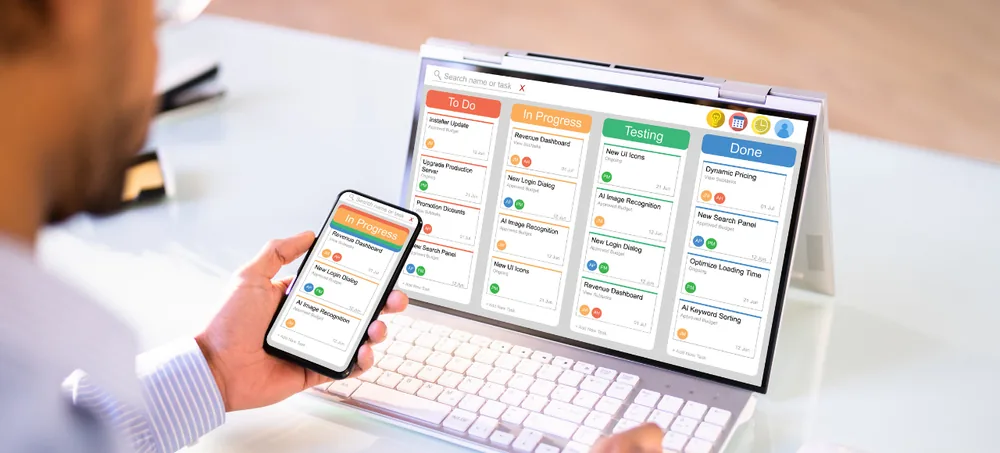
Custom CRM for Leads, Sales, Follow-Ups, Marketing and Customer Service. Businesses comparing CRM software companies in UAE need more than a basic contact-management application. The right CRM partner understands the sales process, configures business-specific stages, automates follow-ups, connects communication channels, develops useful reports, trains users and supports future requirements. ERPLax provides customizable CRM solutions for small, medium and growing businesses operating across the UAE.
Get a free consultation for your CRM requirement in the UAE.
Customer information is often spread across spreadsheets, personal phones, email inboxes, messaging applications, notebooks and separate billing systems. This fragmented approach can create:
A new enquiry can be captured, assigned to a salesperson, qualified, moved through the pipeline, followed up, converted into a quotation, approved and tracked until closure — all inside one connected CRM.
CRM stands for Customer Relationship Management. CRM Software is a business application used to organize customer information and manage interactions with potential and existing customers — connecting lead management, contact records, opportunities, sales pipelines, quotations, follow-ups, marketing campaigns, customer service and reports in one place.
Custom CRM Software is configured or developed according to a company's actual sales, marketing and customer-service workflow — custom lead fields, business-specific opportunity stages, automatic assignment, multiple pipelines and industry-specific screens. ERPLax can begin with essential lead and sales modules and add marketing, service, contracts, field sales and integrations later.
A complete CRM software company understands how leads enter the business, how salespeople qualify them, how managers approve quotations and how customers are supported after conversion. Services typically include:
CRM systems centralize customer information and connect lead management, contacts, sales activity, opportunities, campaigns, service and reporting.
Record leads from websites, calls, emails, referrals, campaigns, exhibitions and social channels.
Assign each lead, customer, opportunity, territory or account to the responsible salesperson or team.
Schedule calls, meetings, demonstrations, site visits, quotation follow-ups and renewal reminders.
Track opportunities according to qualification, proposal, negotiation, approval and closure stages.
Keep contact details, activities, requirements, documents, quotations and communication history in one system.
Review expected values, closure dates, probabilities, pipeline stages and salesperson forecasts.
Ensure sales teams follow consistent qualification, follow-up, quotation and approval procedures.
Track requests, complaints, support tickets, service schedules, contracts and resolution status.
Create reminders, assignment rules, escalations, notifications and recurring activities.
Review lead sources, conversion rates, pending activities, ageing opportunities and team performance.
Add salespeople, branches, territories, pipelines, customer categories and integrations as you expand.
What do CRM software companies provide? ERPLax studies the current customer-management process before configuring the CRM, then delivers the full range of services a business needs.
ERPLax studies the current customer-management process — lead sources, sales-team structure, qualification and approval hierarchy — before configuring the CRM.
Industry-specific lead forms, multiple sales pipelines, tender tracking, contract management and field-sales applications.
Custom fields, lead stages, opportunity stages, activity types, territories, approval workflows and email templates.
Requirement analysis, process mapping, configuration, migration planning, testing, training and controlled go-live.
Move agreed companies, contacts, leads, customers, territories, open opportunities and contracts from existing systems.
Connect CRM with business websites, ERP Software, accounting applications, WhatsApp, SMS gateways and telephony platforms.
Practical, role-based training for lead-entry users, sales representatives, sales managers, marketing and service teams.
Ongoing user assistance, permission changes, workflow updates, report development and new module development.
Instead of depending on spreadsheets or employee memory, sales, marketing and service teams work with one defined process, clear ownership and full activity history.
Website, phone, email, WhatsApp, referral and exhibition leads with source tracking and duplicate checks.
Manual, automatic, territory-based, branch-based and round-robin assignment with unassigned-lead reports.
Requirement, budget, timeline, decision-maker and qualification-score tracking with disqualification reasons.
Company records, categories, industry, branch, territory, credit information and complete activity history.
Decision-makers, job titles, communication preferences, meeting history and multiple contact persons.
Expected value, closure date, sales stage, probability, competitors and won-and-lost reasons.
Separate pipelines for product, service, project, tender, dealer and property sales, each with its own stages.
Schedule and monitor calls, meetings, demonstrations, site visits and renewal reminders.
Assign, track and complete sales and service-related tasks tied to leads, accounts and opportunities.
Product selection, pricing, discounts, currencies, approvals, revisions and status tracking.
Multi-level quotation, discount and pricing approvals routed to authorized users.
Expected values, probabilities, closure dates and team-level forecasts from live pipeline data.
Set and track individual, team and territory-level sales targets against actuals.
Group customers by category, industry, value, region or behaviour for targeted engagement.
Plan campaigns, audience segments, responses and marketing-qualified-lead conversion.
Templates, automated notifications, customer email history and agreed email workflows.
Business-API messaging, templates and notification workflows for customer communication.
Support requests, complaints, tickets, priorities, escalations and resolution history.
Contract dates, values, billing schedules, renewal dates and renewal-opportunity tracking.
Response targets, priorities and escalation rules for customer-service requests.
Mobile-friendly access for site visits, customer updates and on-the-go quotation approvals.
Region, branch and team-based territory allocation with performance reporting.
Branch-wise leads, users, customers, targets and reports with consolidated dashboards.
Configure the interface and communication templates for multilingual UAE sales teams.
Lead, customer, follow-up, opportunity, approval and dashboard functions on mobile devices.
Lead, pipeline, forecast, activity, campaign and service reports for management review.
Team, branch, territory and role-level access with activity history and audit trails.
ERPLax can configure sales, marketing, service, operational and analytical CRM capabilities around each organization's own workflow.
Enquiries, leads, contacts, accounts, opportunities, pipelines, follow-ups, quotations, approvals, targets, forecasts and sales reports.
Lead sources, campaigns, audience segments, email workflows, templates, campaign responses and marketing-qualified leads.
Support requests, complaints, tickets, priorities, assignments, escalations, contracts, renewals and resolution history.
Lead capture, automatic assignment, follow-up scheduling, task automation, quotation approvals and service escalation.
Lead trends, source performance, conversion rates, pipeline movement, sales forecasts and team productivity.
Every business follows a different customer-acquisition and sales process — ERPLax configures CRM around your products, customer types and sales territories.
Product enquiries, quotations, price negotiations, order conversion and customer profitability.
Dealer leads, distributor onboarding, territory allocation and collection activities.
Technical requirements, sample requests, demonstrations and dealer enquiries.
Tender opportunities, consultant and contractor contacts, BOQ references and contract conversion.
Property enquiries, broker records, viewing schedules and payment-plan discussions.
Customer profiles, purchase history, loyalty activities and repeat-purchase campaigns.
Service enquiries, route requirements, shipment volumes and contract renewals.
Client enquiries, proposals, consultation schedules and recurring billing.
Corporate and event enquiries, group bookings and guest feedback.
Student enquiries, course interests, counselling schedules and admission opportunities.
Keep companies, contacts, leads, opportunities, activities, quotations and service records in one platform.
Assign new enquiries quickly and notify responsible team members.
Track scheduled, completed, overdue and upcoming customer activities.
Review every active opportunity according to stage, value, probability and expected closure date.
Use pipeline data to estimate expected monthly or quarterly business.
Create reminders, escalation rules and ageing reports for inactive leads and opportunities.
Track ownership, activities, updates, stage changes and closure reasons.
Connect opportunity information with pricing, approvals, revisions and quotation status.
Maintain support requests, complaints, contracts, communication and resolution history.
Compare lead sources, audience segments, campaign responses and conversion performance.
Configure stages, forms, fields, activities, approvals and reports around the business.
Add users, branches, territories, pipelines, modules and integrations as the company grows.
A phased implementation introduces priority modules first and expands the CRM as users become comfortable with the system.
Small businesses can begin with essential CRM functions and expand later.
Growing SMEs can add branch-level access, several pipelines and forecasting.
Larger organizations can configure CRM for complex, multi-entity structures.
A structured, ten-step implementation process used across ERPLax CRM projects in the UAE.
Understand current systems, sales process, users, reports, pain points and growth plans.
Document how leads enter, qualify, move through the pipeline and convert to customers.
Define pipelines, modules, custom requirements, reports, integrations and rollout phases.
Configure lead stages, opportunity stages, territories, user roles and approval workflows.
Develop agreed forms, calculations, reports, integrations and mobile functions.
Prepare customer, contact, lead, opportunity and other agreed records.
Test complete lead-to-close transactions across all relevant pipelines.
Train users according to their daily sales, marketing or service responsibilities.
Introduce the CRM according to the agreed implementation plan.
Monitor usage, resolve issues and refine workflows where required.
ERPLax can recommend a deployment approach after reviewing your users, locations, infrastructure, accessibility and security requirements.
Cloud CRM can support businesses that need remote, mobile-friendly access.
Cloud deployment may suit organizations with specific infrastructure needs.
Businesses looking for the best CRM software companies in UAE should compare practical capability rather than relying only on “top” or “best” claims.
The CRM company should understand how leads are captured, qualified, assigned, followed up, quoted, approved and converted.
Review whether the CRM can support the terminology, customer types, activities, documents and pipelines used in your industry.
Check whether fields, forms, stages, pipelines, workflows, approvals, documents and reports can be customized.
The provider should offer a structured process covering requirement analysis, workflow mapping, migration, testing and training.
Review whether the CRM can connect with websites, email, WhatsApp, SMS, ERP, accounting and other applications.
Existing customer, contact, lead, opportunity and activity data should be cleaned and reviewed before migration.
Salespeople, field teams, managers and service users may need access outside the office.
Dashboards should reflect the lead, sales, forecasting, activity, campaign and service indicators important to management.
Check whether the system can automate assignment, follow-ups, reminders, escalations and recurring tasks.
Customer, pricing, opportunity, quotation and service information should have role-based access.
The CRM should support additional users, branches, territories, pipelines, modules and integrations.
Employees should receive practical training based on their daily CRM responsibilities.
Clarify how issues, workflow updates, reports, integrations, user changes and future development will be managed.
The right CRM company is one that understands your customer lifecycle, configures a practical workflow, supports user adoption and can evolve the system as the business grows.
ERPLax does not claim to be the automatic best CRM software companies in UAE, top CRM software companies in UAE or best CRM system in UAE pick among every CRM companies in UAE, CRM solution providers in UAE or CRM software company UAE option. Whether you are reviewing a list of CRM software companies in UAE, comparing CRM providers in UAE, or evaluating UAE CRM software and business CRM software UAE options more broadly, ERPLax is happy to show how our approach compares against the criteria above — including for businesses researching the best CRM software companies in UAE or CRM platform UAE choices for their team.
The same evaluation approach applies whether you need a broader Customer Relationship Management Software UAE deployment, a focused CRM System UAE rollout for one department, or are specifically comparing CRM Software Dubai and Best CRM Software in Dubai options for a Dubai-based team.
ERPLax configures CRM Software around your actual lead, sales, marketing and customer-service workflows.
Supports small businesses, SMEs, multi-branch companies and larger sales teams.
Manage enquiries, leads, contacts, opportunities, quotations, follow-ups, service and renewals.
Configure separate pipelines for products, services, projects, tenders, properties or divisions.
Begin with sales CRM and add marketing, service, field sales and integrations phase by phase.
Select a deployment model based on accessibility, infrastructure and security requirements.
Control leads, users, customers, targets and reports by branch, territory or sales team.
Protect customer, opportunity, pricing, quotation and service information by responsibility.
Automate assignment, reminders, approvals, notifications, escalations and recurring activities.
Build lead, pipeline, forecast, activity, sales, marketing and service reports.
Connect supported websites, email, WhatsApp, SMS, ERP, accounting and external systems.
Plan configuration, data preparation, migration, testing, training and controlled go-live.
User training, issue assistance, workflow updates and reporting enhancements per agreed scope.
CRM Software is a business system used to manage leads, customer accounts, contacts, opportunities, follow-ups, quotations, marketing activities, customer service and reports.
CRM companies may provide consulting, configuration, customization, implementation, data migration, integration, training and ongoing support.
Yes. ERPLax provides customizable CRM solutions for businesses operating across the UAE.
Yes. Lead fields, stages, pipelines, forms, activities, approvals, reports, dashboards, documents and integrations can be customized.
Yes. Small businesses can begin with lead capture, customer records, follow-ups, opportunities, quotations, tasks and basic reports.
Yes. SMEs can add branches, territories, multiple pipelines, sales targets, marketing campaigns, service management and integrations.
Yes. Separate pipelines can be configured for products, services, projects, tenders, properties, contracts or business divisions.
Yes. Assignment rules can be configured according to territory, product, branch, team, priority or other agreed conditions.
Yes. Users can schedule calls, meetings, demonstrations, site visits, quotation follow-ups and renewal activities.
Yes. Quotations can include products, services, prices, discounts, currencies, payment terms, approvals and status tracking.
Yes. Forecast reports can use pipeline value, probability, expected closure dates, team forecasts and committed opportunities.
Yes. Customer-service modules can manage requests, complaints, priorities, assignments, escalations and resolution notes.
Yes. Contract dates, values, billing schedules, renewal dates, reminders and renewal opportunities can be tracked.
Yes. Website and landing-page forms can be connected for lead capture according to the website technology and integration scope.
WhatsApp Business API integration can be added based on approved account access, provider configuration and technical feasibility.
Yes. Email SMTP, templates, automated notifications, customer email history and agreed email workflows can be configured.
Yes. CRM can connect with ERP modules for customers, products, quotations, sales orders, inventory and billing according to project requirements.
Yes. ERPLax can provide cloud-based CRM. Cloud deployment can also be considered according to infrastructure and business requirements.
Selected lead, customer, follow-up, opportunity, quotation, approval, service and dashboard functions can be provided through mobile-friendly access.
Yes. Customer, contact, lead, opportunity, activity, product and other agreed information can be migrated from supported files or existing systems.
The timeline depends on users, pipelines, custom workflows, integrations, data migration, reports, testing and training requirements.
CRM cost depends on users, modules, customization, branches, pipelines, integrations, deployment, migration, implementation, training and support.
Compare companies based on process understanding, customization, implementation, migration, integrations, mobile access, reporting, security, scalability, training and support.
The most suitable CRM is the one that fits your customer lifecycle, sales process, team structure, reporting requirements, integrations and growth plans.
Do not let enquiries, follow-ups, quotations and customer communication remain scattered across spreadsheets, inboxes and personal devices. ERPLax provides customizable CRM solutions for businesses operating across the UAE.
Specialized Applications
Purpose-built & ready to deploy. Hover to explore, click to learn more.
Testimonials
Real stories from businesses running their operations on ERPLax.
ERPLax gave us real-time visibility into stock across three warehouses. Wastage dropped and our fulfillment time improved almost overnight.
GST e-invoicing used to eat up two days every month. With ERPLax's accounting module it's now automatic and our filings are always on time.
Billing at our stores used to take a minute per customer. ERPLax's POS module cut that to under 15 seconds, even during peak festival rush.
Payroll for 200+ employees across two branches used to take our HR team a full week. ERPLax's HRM module now runs it in a single afternoon.
Tracking batch numbers and expiry across our distribution network was a nightmare on spreadsheets. ERPLax's inventory module made it effortless.
Front desk, housekeeping and billing are now all on one screen. ERPLax's hotel management module has made check-in day a breeze for our staff.
Fee collection, attendance and report cards used to live in three different tools. ERPLax brought it all into one dashboard our staff actually enjoys using.
Tracking material costs and site progress across four active sites was chaos before ERPLax. Now our project managers update status from their phones daily.
Our online store orders now sync straight into inventory and accounting — no more manual entry, no more overselling out-of-stock items.
Our sales team can now see every lead's history and follow-ups in one place. Deal closures are faster and nothing falls through the cracks anymore.
ERPLax gave us real-time visibility into stock across three warehouses. Wastage dropped and our fulfillment time improved almost overnight.
GST e-invoicing used to eat up two days every month. With ERPLax's accounting module it's now automatic and our filings are always on time.
Billing at our stores used to take a minute per customer. ERPLax's POS module cut that to under 15 seconds, even during peak festival rush.
Payroll for 200+ employees across two branches used to take our HR team a full week. ERPLax's HRM module now runs it in a single afternoon.
Front desk, housekeeping and billing are now all on one screen. ERPLax's hotel management module has made check-in day a breeze for our staff.
Fee collection, attendance and report cards used to live in three different tools. ERPLax brought it all into one dashboard our staff actually enjoys using.
Tracking material costs and site progress across four active sites was chaos before ERPLax. Now our project managers update status from their phones daily.
Our online store orders now sync straight into inventory and accounting — no more manual entry, no more overselling out-of-stock items.
Our sales team can now see every lead's history and follow-ups in one place. Deal closures are faster and nothing falls through the cracks anymore.
