Scale smarter with a complete AI-driven ERP solution built for manufacturing, distribution, and e-commerce businesses etc...

Manufacturing ERP Systems UK | Custom ERP | ERPLax
Trusted by 1500+ Manufacturers & Businesses

Manufacturing ERP Systems UK Built Around Your Production Workflow

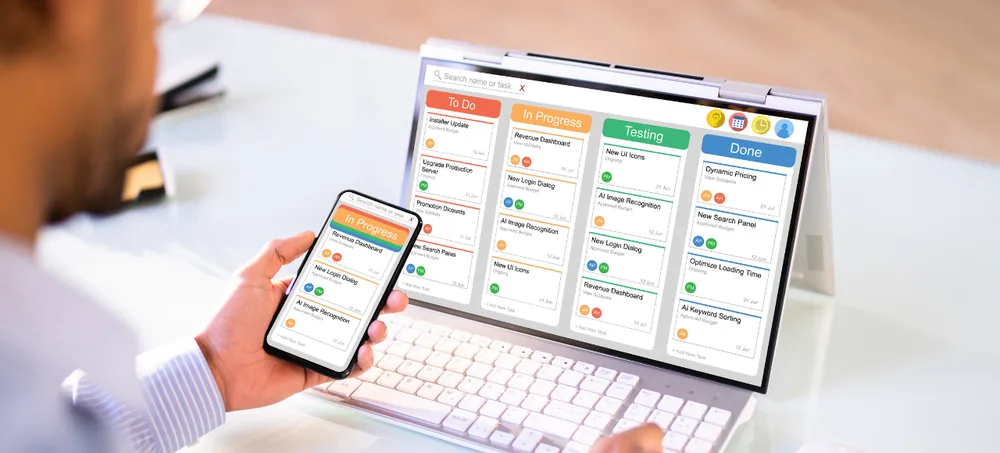
Manufacturing ERP systems UK production dashboard by ERPLax
19+ Years Delivering ERP
1700+ Projects Completed

ERPLax provides custom manufacturing ERP systems for UK businesses that need better control over production without forcing their operations into a rigid, one-size-fits-all system. Manage MRP, BOMs, production schedules, work orders, inventory, purchasing, quality checks and costing from one connected platform.

MRP & BOMProduction PlanningShop Floor ControlQuality & TraceabilityCloud or On-Premise
Request a Custom Manufacturing ERP Demo
Tell us about your production process — we'll get back within 24 hours.
RKASMP
Verified Experts
Free ConsultationNo Obligation24hr Response
19+
Years of ERP Delivery
1500+
Clients Served
1700+
Projects Completed
20+
Manufacturing ERP Modules
The Challenge

Custom Manufacturing ERP Systems for UK Businesses

Manufacturers often depend on a combination of spreadsheets, accounting packages, stock systems, production boards and manual paperwork — making it difficult to obtain a reliable view of material availability, work in progress and manufacturing costs.

Raw Material Shortages

Disconnected spreadsheets and stock systems make it difficult to know what materials are actually available before a job reaches the shop floor.

Excess or Obsolete Stock

Without a shared view of demand and consumption, manufacturers can end up holding stock that is never used.

Delayed Production Orders

Manual coordination between sales, planning and production leads to slower order releases and inaccurate delivery dates.

Duplicate Data Entry

The same order, material or customer details are often re-entered across separate systems, increasing the risk of error.

Limited Batch or Serial Traceability

Spreadsheets rarely provide reliable backward and forward traceability from material receipt to customer dispatch.

Slow Management Reporting

Directors and managers wait on manually compiled reports instead of viewing production, cost and stock information in real time.

ERPLax brings production and business operations together in a single, configurable manufacturing management system. Sales orders can create production demand, material planning can identify shortages, and work orders can move through defined production stages — giving sales, planning, purchasing, production, stores, quality and finance teams access to consistent business data.

The Solution

One Connected Manufacturing ERP System

Instead of operating each department through separate applications, ERPLax stores related information in a central, configurable platform.

SalesMaterialPurchaseWorkQualityFinishedDispatch

Order-to-Dispatch Visibility

Follow a sales order from confirmation through material planning, production, quality checking and dispatch in one connected trace.

Configured Around Your Process

ERPLax customises these processes according to your products, production methods, approval levels and terminology.

Shared Data Across Teams

Sales, planning, purchasing, production, stores, quality and finance teams work from consistent, real-time business data.

What Is Manufacturing ERP?

What Is Manufacturing ERP Software?

An Integrated Production & Business System

Manufacturing ERP software is an integrated business system designed to manage both production operations and the wider commercial activities of a manufacturing company — connecting quotations, sales orders, demand planning, MRP, BOMs, production routing, work orders, inventory, purchasing, quality, dispatch, invoicing and reports.

One Platform, Every Department

An authorised user can follow an order from the initial quotation through material planning, production, quality checking, dispatch and financial reporting — without repeatedly entering the same information across separate systems.

ERPLax is manufacturing ERP software UK businesses can rely on for connected operations. As ERP systems for manufacturing and ERP software for manufacturers go, ERPLax is offered as flexible manufacturing software UK teams can configure around discrete, process or mixed-mode production — and as an ERP for manufacturing SMEs as well as larger, multi-site operations. Whether you need focused MRP software UK or a broader end-to-end system, ERPLax customises these processes according to the manufacturer's products, production methods, approval levels, terminology and reporting requirements.

Manufacturing ERP vs MRP

Manufacturing ERP and MRP: What Is the Difference?

MRP and ERP are closely related, but they do not cover exactly the same scope. ERPLax can provide focused manufacturing MRP systems or a broader end-to-end manufacturing ERP, depending on your operational requirements.

What Is MRP?

Material Requirements Planning focuses primarily on production materials and scheduling — helping answer what needs to be manufactured, purchased and when.

  • Focuses on production materials & scheduling
  • Uses demand, stock, BOMs & lead times
  • Answers 'what needs to be purchased and when'
  • Calculates material requirements

What Is Manufacturing ERP?

Manufacturing ERP includes MRP capabilities but connects them with wider business functions across the whole organisation.

  • Includes full MRP capabilities
  • Connects sales, CRM, purchasing, warehouses & finance
  • Links customer order to supplier purchase to dispatch
  • Covers approvals, maintenance, reports & integrations
Why UK Manufacturers Need It

Why UK Manufacturers Need an Integrated ERP System

Improve Production Visibility

See which orders are planned, released, delayed, in progress or completed from one central view, so teams can respond earlier.

Reduce Spreadsheet Dependency

Replace scattered spreadsheets with a structured ERP workflow that reduces repeated entry as order volumes and BOM levels increase.

Plan Materials More Accurately

Connect demand with available stock, expected receipts and minimum levels so purchasing focuses on real shortages, not estimates.

Coordinate Sales and Production

Give sales teams visibility of order progress without repeatedly contacting production, while production receives clearer demand.

Improve Stock Control

Track raw materials, components, work in progress and finished goods within the same system to see what's located, reserved or consumed.

Control Manufacturing Costs

Compare planned and actual use of materials, labour, subcontracting and overheads to support pricing and margin decisions.

Strengthen Traceability

Connect batch, lot and serial records across purchased materials, production orders, quality checks and finished products.

Scale With Connected Modules

Start with inventory, purchasing and production, then add CRM, accounting, HRM, maintenance and advanced reporting in later phases.

Features

Key Features of ERPLax Manufacturing ERP

Twenty connected modules covering production planning software, manufacturing inventory software, bill of materials software and shop floor management software — all configurable around your workflow.

Production Planning & Scheduling

Create production plans using confirmed sales orders, forecasts, stock demand or internal requirements — configurable for make-to-stock, make-to-order or assemble-to-order production planning software workflows.

  • Daily/weekly/monthly plans
  • Machine & work-centre allocation
  • Delayed order alerts
  • Planned vs completed production

Material Requirements Planning

ERPLax also works as material requirements planning software, using demand, stock availability and BOM quantities to calculate gross and net material requirements.

  • Available & reserved stock
  • Supplier lead times
  • Suggested purchase quantities
  • Shortage reports

Bill of Materials Management

A dedicated bill of materials software module supports single and multi-level BOMs, subassemblies, alternative materials, wastage and version control.

  • Multi-level BOM
  • BOM version control
  • Effective dates
  • Revision approvals

Production Routing & Operations

Define the sequence of operations, work centres, machines, labour categories and quality checkpoints required to manufacture a product.

  • Standard setup/run time
  • Internal or subcontracted ops
  • Quality checkpoints
  • Operation-level status

Work Orders & Job Cards

Convert production requirements into controlled work orders with digital job cards that reduce reliance on paper records.

  • BOM & routing reference
  • Material issue status
  • Produced & rejected quantity
  • Completion approval

Shop Floor & WIP Tracking

This shop floor management software layer tracks work started, paused and completed alongside quantities produced, scrap and downtime reasons.

  • Work-in-progress location
  • Labour & machine time
  • Supervisor approval
  • Mobile & terminal entry

Raw Material & Finished Goods Inventory

A complete manufacturing inventory software module manages raw materials, components, WIP, finished goods and scrap from one system.

  • Stock reservations & transfers
  • Goods receipt
  • Minimum stock alerts
  • Stock ageing

Multi-Warehouse & Location Management

Control inventory across factories, stores, warehouses and internal production locations, including quality-hold and subcontractor locations.

  • Bins, racks & zones
  • Inter-warehouse transfers
  • Transfer approvals
  • Location-wise reports

Batch, Lot & Serial Traceability

Maintain traceability from receipt through production and dispatch, supporting food, chemicals, pharmaceuticals and engineering environments.

  • Forward & backward traceability
  • Batch consumption
  • Expiry/retest date
  • Recall-support reports

Purchase & Supplier Management

Connect material planning with procurement — requisitions, RFQs, supplier comparison, approvals and delivery schedules.

  • Supplier quotation comparison
  • Approval workflows
  • Supplier performance reports
  • Pending purchase reports

Sales, Quotations & Order Management

Manage the commercial process from enquiry to delivery, feeding confirmed orders into production and material planning automatically.

  • Leads & opportunities
  • Credit controls
  • Dispatch instructions
  • Sales returns

Product Configuration & Variants

Define attributes such as size, colour, grade, material and finish, linked to quotations, sales orders and BOM selection.

  • Size/colour/grade options
  • Customer-specific specs
  • Optional components
  • Product revision

Quality Control & Inspection

Create quality checkpoints for purchased materials, production operations and finished goods, with pass/fail/conditional status.

  • Incoming & in-process checks
  • Quality-hold stock
  • Corrective actions
  • Certificate records

Rejection, Scrap & Rework

Record non-conforming production and its impact on stock and cost, with reason codes and rework work orders.

  • Reason codes
  • Rework work orders
  • Cost of poor quality
  • Rejection trends

Subcontracting Management

Manage production processes completed by external suppliers, including material sent, subcontract charges and variance.

  • Subcontract purchase orders
  • Stock at supplier location
  • Quantity variance
  • Pending material reports

Production Costing

Calculate the cost of manufactured products using materials, labour, machine time, subcontracting and overheads.

  • Standard vs actual cost
  • Product margin
  • Order profitability
  • Cost variance

Machine & Maintenance Records

An optional maintenance module connects equipment records with preventive and corrective maintenance activity.

  • Preventive maintenance plans
  • Breakdown records
  • Spare-parts usage
  • Service history

Finance & Accounting Integration

Connect manufacturing transactions with finance — invoicing, accounts receivable/payable, cost centres and VAT-ready invoice configurations.

  • Customer & supplier invoicing
  • Cost centres
  • VAT-ready configuration
  • Manufacturing cost summaries

Reports & Manufacturing Dashboards

Provide each department with relevant operational information, from production plan vs actual to stock valuation and margin.

  • Work-order status
  • Machine & labour utilisation
  • Batch traceability
  • Custom management KPIs

User Roles, Permissions & Audit History

Control access according to department and responsibility, with approval limits, record-level controls and audit history.

  • Role-based access
  • Site/warehouse restrictions
  • Password policies
  • Activity logs
Benefits

Benefits of Manufacturing ERP Software

Real-Time Operational Visibility

View production, materials, purchasing, orders and stock from one connected system rather than waiting for separate departmental updates.

Faster Order Processing

Information flows from quotation and sales order to planning, production, dispatch and invoicing with fewer manual handovers.

Better Material Availability

MRP calculations and shortage reports help teams identify requirements before a production job reaches the shop floor.

Improved Inventory Control

Understand stock availability across raw materials, components, work in progress and finished goods.

Reduced Manual Errors

Shared master data, automated calculations and structured approvals reduce the need to copy information between systems.

More Reliable Production Planning

Planners can use current demand, stock and order information when preparing production schedules.

Better Cost Visibility

Track material consumption, labour, subcontracting, wastage and overheads to understand production costs and margins.

Improved Customer Communication

Sales teams can access authorised order and production information when responding to customer enquiries.

Stronger Process Control

Digital work orders, inspections, approvals and audit histories create greater consistency across manufacturing operations.

Scalable ERP Architecture

Start with essential production and stock modules, then add finance, CRM, HRM, maintenance and automation as requirements grow.

Custom Manufacturing Workflow

ERPLax configures screens, statuses, approvals, documents, dashboards and reports around the way your organisation operates.

Who Can Use ERPLax

Manufacturing Businesses That Can Use ERPLax

ERPLax can be configured for small, medium-sized and growing manufacturing businesses across the UK — suitable for a custom manufacturing ERP build or an ERP for small manufacturing business just starting to move away from spreadsheets.

Manufacturing Models

Make-to-StockMake-to-OrderAssemble-to-OrderEngineer-to-OrderBatch ManufacturingRepetitive ManufacturingJob-Shop ManufacturingProject-Based ManufacturingDiscrete ManufacturingProcess ManufacturingMixed-Mode Manufacturing

Suitable Manufacturing Industries

Engineering & FabricationAutomotive ComponentsAerospace Component SuppliersElectrical & Electronic ProductsMachinery & EquipmentMetal ProductsPlastics & PolymersRubber ProductsPackagingPrintingFurnitureTextiles & GarmentsFood & Beverage ProductionChemical ManufacturingCosmeticsPharmaceutical & Healthcare ProductsBuilding MaterialsConsumer ProductsIndustrial EquipmentContract ManufacturingPrecision Manufacturing
How It Works

How the Manufacturing ERP Workflow Operates

Step 1: Set Up Products & Manufacturing Data

Create product masters, raw materials, BOMs, production routes, work centres, machines, suppliers and customers.

Step 2: Capture Demand

Demand can come from customer quotations, confirmed sales orders, forecasts or internal production requests.

Step 3: Plan Materials & Production

Review demand, stock, open purchases and existing production orders before approving proposed requirements.

Step 4: Procure Required Materials

Convert shortages into purchase requisitions or orders. Received materials are routed through quality inspection.

Step 5: Release Work Orders

Approved production orders are assigned to work centres, machines, teams or subcontractors with job cards generated.

Step 6: Issue & Consume Materials

Raw materials and components are issued against production orders, with actual consumption and variances recorded.

Step 7: Record Production & Quality Results

Operators enter produced, rejected, scrapped and reworked quantities. Required quality checks are completed before stock release.

Step 8: Receive Finished Goods

Completed products are transferred to the relevant finished-goods location with applicable batch or serial information.

Step 9: Dispatch & Invoice

Approved finished goods are allocated to customer orders, picked, dispatched and invoiced.

Step 10: Review Reports

Managers monitor production performance, costs, shortages, delays, stock and profitability through dashboards and reports.

Integrations

Manufacturing ERP Integrations

ERPLax can be connected to existing business software, equipment and external services according to API availability and agreed project scope.

Ecommerce Websites
B2B Customer Portals
Supplier Portals
Xero
QuickBooks
Sage-Compatible Workflows
Making Tax Digital-Compatible Platforms
Payment Gateways
Email SMTP
SMS Gateways
WhatsApp Business API
Barcode Scanners
QR Code Scanners
Label & Thermal Printers
RFID Systems
Weighing Scales
Courier & Logistics APIs
CAD & Product Data Systems
Manufacturing Execution Systems
Machine/IoT Data Sources
Deployment

Cloud or On-Premise Manufacturing ERP

ERPLax manufacturing ERP can be deployed according to your infrastructure, access and security requirements — as a fully cloud manufacturing ERP, on-premise, or hybrid implementation.

Cloud Manufacturing ERP

  • Access from different sites
  • Remote management
  • Centralised updates
  • Reduced dependence on local servers

On-Premise Manufacturing ERP

  • Local infrastructure control
  • Internal hosting policies
  • Restricted network access
  • Greater control over update schedules

Hybrid Deployment

  • Combine cloud services with local systems
  • Reviewed against connectivity & IT policy
  • Flexible for multi-site operations
  • Defined after requirement review
Implementation

ERPLax Manufacturing ERP Implementation Process

1

Business Discovery

ERPLax reviews your current production, purchasing, inventory, quality, sales, finance and reporting processes.

2

Requirement Mapping

The project team documents modules, users, data fields, approval levels, integrations, reports and deployment requirements.

3

ERP Configuration & Development

Standard capabilities are configured and custom workflows are developed where needed.

4

Data Preparation & Migration

Relevant master data and opening information can be migrated from spreadsheets, existing software or legacy databases after validation.

5

Testing

The system is tested using realistic manufacturing scenarios, including purchasing, production, quality, stock receipt and reporting.

6

User Training

Role-based training is provided for planners, production teams, purchasing, warehouse users, quality teams, sales and finance.

7

Go-Live

The ERP is launched using an agreed rollout plan, either all together or introduced in phases.

8

Support & Improvement

After go-live, the system can be refined as users gain experience and business requirements change.

Why ERPLax

Why Choose ERPLax for Manufacturing ERP Systems in the UK?

ERP Based on Your Actual Workflow

ERPLax begins by understanding how your products, materials, approvals, production stages and teams operate, then configures the system around those requirements.

Custom Manufacturing ERP Development

Custom fields, documents, approvals, dashboards, integrations and reports can be developed where standard configurations are not sufficient.

Modular & Scalable System

Begin with the modules that solve your immediate operational problems, then add CRM, finance, HRM, maintenance or ecommerce in later phases.

Suitable for SMEs & Growing Manufacturers

ERPLax can support smaller manufacturers moving away from spreadsheets as well as established businesses coordinating multiple departments.

Cloud or On-Premise Deployment

Choose a cloud-based, on-premise or hybrid implementation according to infrastructure and business requirements.

API Integration

Connect the ERP with accounting systems, ecommerce websites, logistics platforms, communication services and production equipment.

Role-Based Access

Provide users with access based on department, site, warehouse, responsibility and approval authority.

Training & Support

ERPLax provides implementation guidance, user training and post-launch support based on the agreed service scope.

ERPLax works with UK manufacturers as a custom manufacturing ERP systems UK partner — alongside manufacturing ERP software for SMEs UK, providing cloud ERP software for manufacturing companies, production planning and inventory software UK, and an ERP system with MRP and BOM management configured around your process. Whether you need ERP software for discrete manufacturing, ERP software for process manufacturing, manufacturing ERP with shop floor control, an approach suited to ERP for make-to-order manufacturing, or manufacturing ERP with accounting integration, ERPLax can be configured accordingly.

FAQ

Frequently Asked Questions

Manufacturing ERP systems are integrated software platforms that connect production planning with inventory, purchasing, sales, quality, costing and finance. They provide manufacturers with a central system for managing operational and commercial information.
MRP primarily focuses on material and production requirements. ERP covers a wider range of business processes, including MRP, sales, procurement, inventory, finance, CRM and reporting. A manufacturing ERP can therefore provide MRP capabilities as part of a broader system.
Yes. ERPLax is designed for small, medium-sized and growing businesses. A manufacturer can begin with production, purchasing and inventory modules before adding finance, CRM, HRM, maintenance or ecommerce.
Yes. ERPLax can customise product data, BOM structures, production stages, job cards, approval workflows, quality checks, reports and integrations according to your manufacturing process.
ERPLax can support single-level and multi-level bills of materials, components, subassemblies, alternative materials, expected wastage, BOM versions, effective dates and approval workflows.
Yes. Production planning can be based on sales orders, forecasts, stock requirements or internal demand. The system can track planned dates, priorities, production quantities, work centres and order progress.
Material requirements planning can be configured using demand, available stock, reserved stock, open purchases, open production orders, BOM quantities and supplier lead times. Planners can review shortages and suggested requirements before creating orders.
Yes. Work orders can move through defined production operations. Users can record started, paused and completed stages together with produced quantities, rejected quantities, material usage and labour time.
ERPLax can track supplier batches, internal lots, production batches and serial numbers. Traceability can link received materials to production orders, quality inspections, finished goods and customer dispatches.
ERPLax can integrate with accounting applications such as Xero, QuickBooks and Sage-compatible workflows where suitable APIs or data-exchange options are available. Integration scope is confirmed after reviewing the existing software and required data flow.
Yes. ERPLax can be deployed in the cloud for access across departments and locations. On-premise and hybrid deployments are also available depending on infrastructure and security requirements.
The ERP can be configured for multiple warehouses, stores, production locations and business units. User access and stock visibility can be restricted by location where required.
ERPLax can calculate costs using materials, labour, machine time, subcontracting, wastage and overheads. Manufacturers can compare planned, standard and actual costs depending on the configured costing model.
The system can be configured for discrete, process or mixed-mode production. The exact design depends on product structures, recipes or formulations, production stages, traceability and costing requirements.
Yes. A phased rollout may begin with inventory, purchasing, BOMs and production. Additional modules such as finance, CRM, HRM, maintenance and ecommerce can be added later.
Relevant data can be migrated after reviewing its structure and quality. Migration may include product masters, customers, suppliers, BOMs, stock balances and open orders.
The timeline depends on modules, custom workflows, integrations, migration requirements, number of sites and testing complexity. ERPLax prepares an implementation plan after completing the requirement analysis.
Cost depends on the number of modules, users, locations, customisations, integrations, deployment method and support requirements. ERPLax provides a tailored quotation after reviewing the manufacturing workflow.

Build a Manufacturing ERP Around Your Business

Move beyond disconnected spreadsheets and isolated software. ERPLax can help you create an integrated manufacturing ERP that connects demand, materials, production, stock, purchasing, quality, sales, finance and reporting while preserving the workflows that make your business different.

Prefer email? info@erplax.in  |  Call +91 97399 66977

Specialized Applications

ERP Solutions Built for Your Industry

Purpose-built & ready to deploy. Hover to explore, click to learn more.

View all modules

Testimonials

What Our Clients Say

Real stories from businesses running their operations on ERPLax.
