
PMO Software India
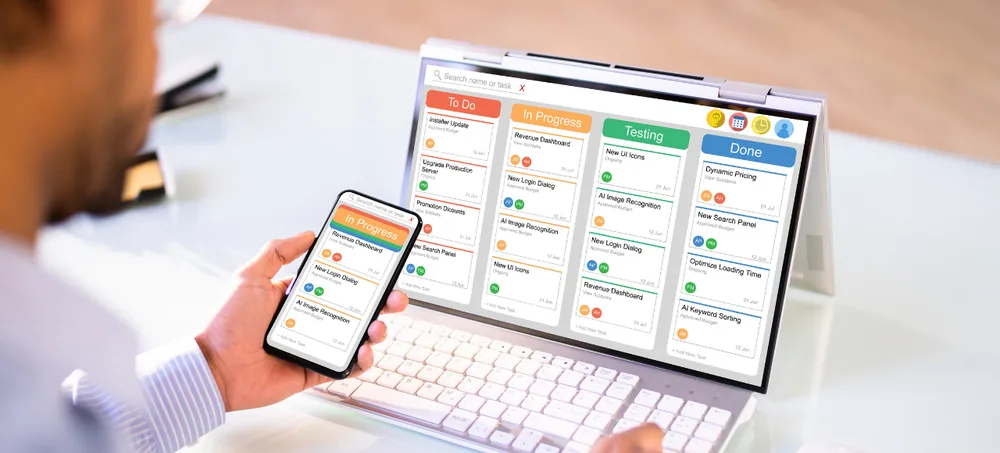
Custom project management office software for projects, resources, budgets, and governance. Manage multiple projects, project plans, tasks, milestones, teams, resources, timesheets, budgets, expenses, approvals, project billing, documents, and management dashboards through one customizable PMO platform — ERPLax helps organizations move beyond independent spreadsheets into one consolidated project environment.
Request Custom ERP Quote
Schedule a free consultation with our project team.
PMO Software India for Better Project Governance
Managing one project with a spreadsheet may be possible — managing dozens of simultaneous projects with multiple project managers, teams, clients, deadlines, budgets, and dependencies is much harder. PMO Software India creates a centralized project-management framework, consolidating project information into one environment instead of asking each project manager to submit independent spreadsheets.
Different Project-Tracking Formats
Every project manager tracks things their own way.
Inconsistent Status Reporting
Reports don't line up across the portfolio.
Missed Milestones
Without tracking, key dates quietly slip.
Poor Project Prioritization
Without a framework, urgency drives decisions instead of priority.
Unclear Resource Allocation
Nobody has a full view of who's working on what.
Employees Assigned to Too Many Projects
Overallocation goes unnoticed without capacity visibility.
Delayed Project Updates
Status information lags behind actual progress.
Incomplete Timesheets
Without a system, time logging falls behind.
Budget Overruns
Without tracking, spend runs past what's planned.
Untracked Project Expenses
Costs get missed without a connected system.
Disconnected Billing
Invoicing lags behind actual project work.
Missing Project Documents
Files scatter across emails and personal drives.
Limited Executive Visibility
Leadership lacks a real portfolio-level view.
Difficult Portfolio Reporting
Consolidating status across projects takes real time by hand.
What Is PMO Software?
PMO stands for Project Management Office — PMO software is a centralized system used by organizations to plan, govern, track, and report multiple projects through consistent processes. A Project Management Office typically handles project intake, prioritization, standards, planning, resource coordination, governance, reporting, budget monitoring, risk tracking, change control, and executive dashboards, often working across departments and simultaneously monitoring projects like ERP implementations, software development, construction, and new branch rollouts. While basic project software focuses on individual tasks, PMO software provides a wider management view:
Individual Project View
Tasks, milestones, team, and budget for a single project.
PMO View
All projects, priority, status, resource capacity, budget, risk, and portfolio dashboard.
Key Features of ERPLax PMO Software India
A complete PMO Software India foundation covering every project in your portfolio.
Project Portfolio Dashboard
See every active, planned, and completed project in one view.
Project Intake Management
Capture and evaluate new project requests before approval.
Project Prioritization
Rank projects according to business priority and capacity.
Project Master
Maintain a master record of every project with core details.
Project Planning
Define project scope, phases, and delivery timelines.
Task Management
Break projects down into trackable, assignable tasks.
Subtask Management
Split complex tasks into smaller, manageable pieces.
Milestone Management
Track key project checkpoints and delivery dates.
Project Schedule Management
Plan timelines and sequence work across projects.
Project Dependency Management
Link tasks and projects so work follows the right order.
Resource Management
Allocate people and equipment across the portfolio.
Resource Capacity Planning
See who's available and who's overallocated.
Timesheet Management
Record employee time against projects and tasks.
Resource Utilization Reports
Understand how effectively resources are being used.
Project Budget Management
Set and track budgets against actual project spend.
Project Expense Management
Record and monitor project-related expenses.
Project Cost Management
Track costs against budgets across the portfolio.
Project Profitability
See margin and profitability by project.
Project Risk Management
Identify and track risks before they become issues.
Issue Management
Log and resolve issues as projects progress.
Change Request Management
Track scope changes and their impact on delivery.
Project Document Management
Keep project files and documents in one place.
Client and Stakeholder Management
Maintain client and stakeholder information alongside projects.
Approval Workflow
Configure approvals for budgets, expenses, and changes.
Project Billing and Invoicing
Connect project work directly to client billing.
PMO Reports and Dashboards
Portfolio-level reporting for governance and oversight.
Why Businesses Need PMO Management Software
What a connected PMO platform solves as project portfolios grow more complex.
Centralize Multiple Projects
Bring every project into one connected system.
Standardize Project Processes
Apply consistent planning and reporting across projects.
Improve Portfolio Visibility
See the full portfolio, not just one project at a time.
Improve Resource Planning
Allocate people across projects without guesswork.
Identify Delayed Projects
Spot at-risk projects before they fall further behind.
Monitor Project Budgets
Track spend against budget across the portfolio.
Track Employee Time
Record timesheets against projects and tasks.
Improve Project Accountability
Give every project a clear owner and status.
Improve Approval Control
Route budget, expense, and change approvals consistently.
Improve Executive Reporting
Give leadership a real-time portfolio view.
Connect Projects With Business Operations
Link projects to billing, purchase, and inventory.
Benefits of Project Management Office Software India
What PMO Software India delivers for organizations running multiple projects.
One View of All Projects
See the entire portfolio from a single dashboard.
Standardized Project Governance
Consistent processes across every project.
Better Resource Allocation
Assign people based on actual availability.
Better Project Prioritization
Focus resources on what matters most.
Better Milestone Tracking
Catch at-risk milestones before they slip.
Better Budget Control
Track spend against budget in real time.
Better Time Visibility
See utilization and time allocation across the team.
Better Risk Management
Identify and address risks earlier.
Better Change Control
Track scope changes and their downstream impact.
Better Executive Reporting
Give leadership the portfolio view they need.
Better Project Accountability
Clear ownership at every level of the portfolio.
Custom PMO Workflow
Configured around your organization's governance process.
PMO Software for Different Industries
ERPLax PMO software can be configured for organizations running multiple projects across different business models.
PMO Workflow
From project request to portfolio review — the eleven stages ERPLax manages for you.
Project Request
Capture new project requests for evaluation.
Review and Prioritize
Assess requests against capacity and business priority.
Approve Project
Formally approve projects before work begins.
Create Project Plan
Define scope, timelines, and deliverables.
Allocate Resources
Assign people and equipment to the project.
Execute Project
Teams complete tasks according to the plan.
Record Time and Expenses
Log timesheets and expenses against the project.
Monitor Project
Track progress, budget, and risk throughout delivery.
Process Billing
Generate client invoices from project work.
Close Project
Complete final deliverables and close out the project.
Portfolio Review
Review completed projects at the portfolio level.
PMO Dashboards for Leadership and Management
Senior management often needs a simpler high-level view rather than opening every project individually — on top of the operational tools project managers use day to day, executive PMO dashboards can focus on:
PMO Workflow Automation
PMO automation can support repetitive project-administration processes, including:
Project Management Software Integrations
PMO software may need to connect with wider business applications.
PMO and ERP Integration
Standalone project management tools may be enough for simple task tracking, but project-driven businesses often require wider business integration — from CRM lead through quotation, project, tasks, resources, timesheets, expenses, billing, and reports. For material-driven projects, this can extend through material requirement, purchase, inventory, project cost, and billing. ERPLax's Projects Module exists within a wider ERP ecosystem, connecting:
PMO Software for Small Businesses in India
Small project-based businesses may not need a complex enterprise PMO at the beginning — this helps the PMO system grow with project complexity.
Starting Point
Projects, Tasks, Milestones, Team, and Reports.
Expansion
Timesheets, Budgets, Expenses, Billing, Approvals, and Portfolio Dashboards.
PMO Software for Medium and Growing Businesses
Growing organizations may require more advanced PMO capabilities, without forcing every organization to follow an identical project model.
Cloud PMO Software India
Cloud PMO software can be useful for organizations whose project teams work across offices, client locations, construction sites, remote teams, and different cities — centralized cloud access helps employees update project information while management reviews consolidated dashboards. Deployment should be selected according to infrastructure, access, security, and integration requirements.
How to Choose the Best Project Management Software in India
The right solution depends on your project types, portfolio size, and governance process. Consider these factors when comparing options.
Project Portfolio Management
Can it centralize and prioritize multiple projects?
Project Planning
Does it support the way you scope and schedule projects?
Resource Management
Can you allocate and plan capacity across the portfolio?
Timesheets
Can employees log time against projects and tasks?
Budget Management
Can you track spend against budget in real time?
Risk and Issue Management
Can risks and issues be logged and tracked?
Change Management
Can scope changes be tracked and approved?
Project Billing
Does billing connect directly to project work?
Approvals
Can budgets, expenses, and changes be approved in-system?
Reports and Dashboards
Can leadership get a portfolio-level view?
Customization
Can workflows be configured to your governance process?
Integration
Can projects connect with ERP, CRM, and billing?
Scalability
Can users, projects, and portfolios expand as you grow?
Why Choose ERPLax PMO Software India?
ERPLax builds PMO software around your actual project governance process.
Custom PMO Software
Built around your actual project governance process.
Centralized Project Portfolio
Every project visible from one dashboard.
Project Planning and Tracking
Structured planning down to individual tasks.
Resource Management
Allocate people and equipment across the portfolio.
Timesheet Management
Accurate time tracking against projects and tasks.
Budget and Expense Management
Track costs and spending throughout delivery.
Project Billing
Connect project work directly to client invoicing.
Project Dashboards
Portfolio-level visibility for management and leadership.
Custom Approval Workflows
Configure approvals for your governance process.
ERP Integration
Connect projects with billing, inventory, and CRM.
Modular and Scalable
Start with core modules and add more as you grow.
Build a More Structured Project Management Office
A PMO should not depend on dozens of spreadsheets, manual project updates, and separately prepared status reports. ERPLax PMO Software India helps organizations manage project portfolios, tasks, milestones, resources, timesheets, budgets, expenses, documents, approvals, billing, and PMO dashboards through one customizable environment.
Frequently Asked Questions
PMO Software India refers to software used by Project Management Offices in India to manage multiple projects, tasks, milestones, resources, timesheets, budgets, expenses, approvals, risks, billing and management reports through a centralized platform.
PMO stands for Project Management Office. A PMO typically helps organizations standardize project planning, governance, resource coordination, monitoring and reporting.
PMO Management Software India is project-management software designed to provide centralized control and reporting across several projects rather than only tracking individual task lists.
Project Management Office Software India is software used to manage project portfolios, schedules, tasks, milestones, resources, budgets, risks, approvals and PMO reports.
Yes, ERPLax provides custom project-management software for planning, tasks, collaboration, resources, timesheets, expenses, billing, dashboards and ERP integration.
Yes, a PMO system can centralize multiple active, planned, delayed and completed projects so management can review portfolio-level information.
Yes, ERPLax includes resource management, resource scheduling and timesheets in its project-management functionality.
Yes, ERPLax includes project budgets, expenses and financial tracking within its project-management environment.
Yes, ERPLax project software can integrate with ERP and is also available within a broader ERP environment containing Projects, CRM, Inventory, HRM, Purchase, Reports and Workflow Automation.
Yes, ERPLax includes billing as part of its project-management software functionality.
There is no single project-management system that is best for every PMO. The right solution depends on project types, portfolio size, project-governance process, resources, timesheets, budgets, reporting, integrations and customization requirements.
Yes, ERPLax's project-management system can be customized around actual project workflows and supports multiple project types including client, internal, IT, construction, marketing, software-development, service-delivery and implementation projects.
Build a More Structured Project Management Office
Whether you are managing client projects, software implementations, construction projects, consulting engagements, internal initiatives, or enterprise-level programs, ERPLax can configure the system around your project-governance process.
Phone: +91 97399 66977 · Email: info@erplax.com