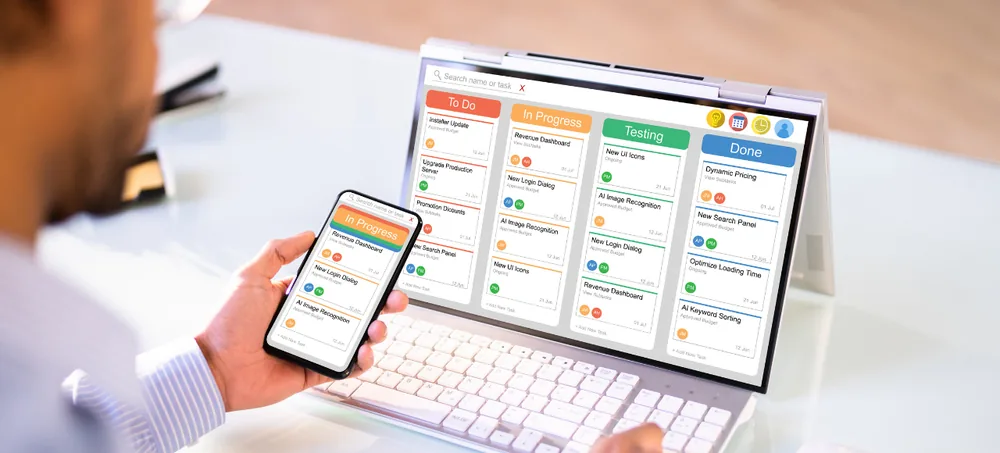
Create, assign, track and complete every work order from one connected ERP system. ERPLax Work Order Management Software helps businesses manage maintenance jobs, service requests, repair tasks, internal work orders, technician assignments, materials, approvals, costs and completion records from one centralized platform.
Get a requirement-based walkthrough for your work order process
Managing hundreds of maintenance, repair, production or service tasks through spreadsheets and manual communication can quickly become difficult. Managers may not know which work orders are pending, employees may receive incomplete information, materials may be unavailable when work starts, approvals can get delayed and completed jobs may not have proper documentation.
Whether you manage a manufacturing plant, facility, service business, warehouse or multi-location operation, ERPLax can be customized according to how your teams actually receive, process and complete work.
Work Order Management Software is a digital system used to create, assign, schedule, monitor and complete jobs or tasks while maintaining a complete record of the work performed — what needs to be completed, which equipment or location is involved, who is responsible, priority, required materials, planned and actual dates, labour details, job status, cost information and completion remarks.
Basic work order software generally focuses on creating jobs, assigning employees and monitoring status. A Work Order ERP Software connects those activities with other business processes: Inventory → Purchase → Work Order → Employee → Material Consumption → Cost → Billing → Reports. This makes ERP-based work order management useful for organizations where jobs are connected with stock, procurement, production, customers, vendors, accounts or multiple departments.
Keep job information organized in one place instead of paper forms and repeated phone calls.
Every work order has an owner, department, priority and current status for clearer monitoring.
Employees see exactly what is assigned, when it should be completed and what to record.
Schedule recurring maintenance and inspection activities based on your configured process.
Connect work orders with inventory so materials used for jobs can be tracked.
Historical records of jobs, repairs and remarks against equipment, customers or locations.
Review pending work orders, completion times, workloads and recurring issues.
Standardized digital workflows make it easier to coordinate additional employees and locations.
Connected modules covering work order creation through role-based security.
Know what work has been requested, assigned, started, delayed or completed.
Digital requests and automated routing reduce unnecessary coordination.
Every job has a responsible person, priority, status and completion record.
Schedule recurring activities and maintain asset-wise maintenance history.
Link materials and spare parts directly with work orders.
Standardized digital forms avoid incomplete entries and inconsistent records.
Track labour, material, vendor and other costs associated with jobs.
Track requests from assignment through completion with service history.
Work order reports give managers more structured operational data.
Adapt the work order process around your organization's actual needs.
Start with work orders and connect additional ERP modules as you grow.
ERPLax can configure work order workflows for a wide variety of businesses.
Manage machine maintenance, production-related work orders, repair activities and internal jobs.
Manage maintenance requests across buildings, facilities, locations and customer sites.
Assign service engineers, monitor field jobs and maintain job completion information.
Manage installation, inspection, preventive maintenance and equipment repair jobs.
Manage installation, maintenance and repair work for customer equipment and locations.
Create site jobs, assign technicians and record materials, labour and completion information.
Manage maintenance work for material-handling equipment and operational infrastructure.
Handle tenant or facility requests and track repair and maintenance jobs across properties.
Maintain structured internal service and equipment-maintenance workflows.
Coordinate room, electrical, plumbing, equipment and facility maintenance jobs.
Track repair and maintenance activities across shops, branches and warehouses.
Manage customer service jobs from request through technician assignment and completion.
Create work request from an authorized user
Review and approve based on priority
Generate work order with required job details
Assign employee, technician or contractor
Check material requirement against inventory
Start work & update the work order
Track progress, delays & material needs
Record completion: labour, material & photos
Verification and closure by supervisor
Reports and analysis via dashboards
One of the biggest advantages of using Work Order Management as part of ERP is the ability to connect operational jobs with actual material movement, rather than keeping maintenance information and stock transactions in separate systems.
Machine Repair Required → Work Order Created → Spare Parts Identified → Inventory Checked → Material Issued → Repair Completed → Cost Recorded → History Updated
Work Order Management for Manufacturing ERP — manufacturing businesses may need different types of work orders, and ERPLax can configure processes for maintenance work orders, machine repair jobs, production work orders, job cards, internal fabrication jobs, rework activities, quality-related tasks, tool maintenance, preventive maintenance and breakdown maintenance. Because ERPLax also provides Manufacturing ERP and Inventory Management solutions, work orders can be designed as part of a wider factory workflow.
ERPLax Work Order Management ERP can be connected with other systems depending on your business requirements.
ERP Module Integrations
Third-Party Integrations
ERPLax can provide deployment options according to project and infrastructure requirements.
Suitable for organizations requiring convenient access across branches, facilities, offices or field locations.
Can be considered for organizations that prefer deployment within their own infrastructure.
The right deployment model can be selected after understanding your user count, locations, connectivity, security requirements and existing IT environment.
ERPLax develops configurable ERP workflows around your job categories, approval levels and departments.
ERPLax configures the system around your required business workflow where technically feasible.
Connect work orders with Sales, CRM, Purchase, Inventory, Manufacturing, Billing, Accounts and HRM.
Start with the modules your business needs and expand the ERP phase by phase.
Choose an appropriate deployment model based on your operational and technical requirements.
Connect ERP with external systems through available APIs and integration methods.
Control what different employees, supervisors and managers can view or update.
Build reports around your work order process, employees, assets, costs and locations.
ERPLax can support implementation, user training and ongoing ERP requirements.
Configured for small, medium and growing organizations without unnecessary modules from day one.
Businesses researching Work Order Tracking Software options often want something purpose-built rather than a generic task list, and ERPLax functions equally well as focused Maintenance Work Order Software or as a complete Work Order Tracking System for teams comparing providers. For field teams, the platform extends naturally into Mobile Work Order Management Software work, doubling as a dependable Work Order Management App for technicians on the move.
Whether your search is for broader Maintenance Management Software or dedicated Preventive Maintenance Software for scheduled inspections, ERPLax remains available as genuine Field Service Work Order Software connecting engineers with jobs across locations. The platform also serves as a complete Digital Work Order System replacing paper forms and spreadsheets.
For organizations automating repetitive job creation and routing, ERPLax functions as reliable Work Order Automation Software, and for teams that need jobs connected with inventory, purchase and manufacturing, it remains a strong fit as complete ERP Work Order Management.
Still tracking maintenance requests and operational jobs through spreadsheets, paper forms or multiple applications? Bring work requests, employees, technicians, materials, inventory, approvals, costs and reports into one configurable ERP workflow. ERPLax can study your existing process and develop a Work Order Management ERP Software according to your departments, locations, users, job categories and reporting requirements. Start with the work order modules you need today and scale your ERP as you grow.
Specialized Applications
Purpose-built & ready to deploy. Hover to explore, click to learn more.
Testimonials
Real stories from businesses running their operations on ERPLax.
ERPLax gave us real-time visibility into stock across three warehouses. Wastage dropped and our fulfillment time improved almost overnight.
GST e-invoicing used to eat up two days every month. With ERPLax's accounting module it's now automatic and our filings are always on time.
Billing at our stores used to take a minute per customer. ERPLax's POS module cut that to under 15 seconds, even during peak festival rush.
Payroll for 200+ employees across two branches used to take our HR team a full week. ERPLax's HRM module now runs it in a single afternoon.
Tracking batch numbers and expiry across our distribution network was a nightmare on spreadsheets. ERPLax's inventory module made it effortless.
Front desk, housekeeping and billing are now all on one screen. ERPLax's hotel management module has made check-in day a breeze for our staff.
Fee collection, attendance and report cards used to live in three different tools. ERPLax brought it all into one dashboard our staff actually enjoys using.
Tracking material costs and site progress across four active sites was chaos before ERPLax. Now our project managers update status from their phones daily.
Our online store orders now sync straight into inventory and accounting — no more manual entry, no more overselling out-of-stock items.
Our sales team can now see every lead's history and follow-ups in one place. Deal closures are faster and nothing falls through the cracks anymore.
ERPLax gave us real-time visibility into stock across three warehouses. Wastage dropped and our fulfillment time improved almost overnight.
GST e-invoicing used to eat up two days every month. With ERPLax's accounting module it's now automatic and our filings are always on time.
Billing at our stores used to take a minute per customer. ERPLax's POS module cut that to under 15 seconds, even during peak festival rush.
Payroll for 200+ employees across two branches used to take our HR team a full week. ERPLax's HRM module now runs it in a single afternoon.
Front desk, housekeeping and billing are now all on one screen. ERPLax's hotel management module has made check-in day a breeze for our staff.
Fee collection, attendance and report cards used to live in three different tools. ERPLax brought it all into one dashboard our staff actually enjoys using.
Tracking material costs and site progress across four active sites was chaos before ERPLax. Now our project managers update status from their phones daily.
Our online store orders now sync straight into inventory and accounting — no more manual entry, no more overselling out-of-stock items.
Our sales team can now see every lead's history and follow-ups in one place. Deal closures are faster and nothing falls through the cracks anymore.
